Firefox PageUp and PageDown keys bug

I found that the page up/down keys stopped working for me in Firefox. Searching around I discovered that caret browsing mode had been turned on and it’s had a bug since 2003. Caret browsing mode is not supposed to alter the page keys but some bug in caret mode breaks the page keys operation.

The fix is to turn off caret browsing mode by pressing F7.

You can also turn off the mode with this setting, “Tools – Options – Advanced – General / Accessibility – “Always use the cursor keys to navigate within pages””.

Bug 205846 – caret eventually gets stuck when trying to scroll with PageDown / PageUp keys

Mozilla/Gecko Keyboard Navigation Proposal

Full Screen Playback of a Whole YouTube Playlist

This information is very old and out of date, please see this new post for up to date information.

Recently  Richard Carter, FCD had a post at The Red Notebook pointing me to YouTube videos of James Burke’s wonderful series “The Day the Universe Changed“. This led me to the JamesBurkeFan’s Channel on YouTube, a fantastic resource, I am thankful he took the time to record, cut up and post all the James Burke video series. JamesBurkeFan even took the extra steps to make playlists for each episode from all of the series. (Note: JamesBurkeFan’s TDTUC episode 4 playlist is backwards, here’s a corrected playlist The Day the Universe Changed Episode 4 Playlist [Update 1/6/08 the JamesBurkeFan channel is no longer available details here.

Using playlists to watch these and other shows cut up to fit YouTube’s 10 minute limit is nice but I did find one annoyance. The problem is that the full screen view always terminates at the end of each video clip. I like to kick back with the Media Center remote for volume and watch the playlists just like regular TV. Having to get up and click the mouse to re-activate full screen mode every ten minutes wrecks the experience for me.

I went searching to find out if it was possible to work around this annoyance. Everything I found was saying, sorry your out of luck until YouTube changes their system. Then I found this post on the I learned something new today blog with a great idea. You take the embed URL from the playlist page, place it in a local HTML file with a few modifications and presto the whole playlist runs while staying in full screen mode. The embed code from that blog post seemed to have a lot more parameters than should be needed so I read the YouTube Embedded Player Parameters from the YouTube APIs and Tools pages @ Google Code. Sure enough the actual requirements are less, all you need to add are these parameters in the right spots.

&fs=1 (gives full screen button on player)

allowfullscreen=”true” (Enables full screen operation)

You also probably need to have an up to date version flash in your browser, I have 9.0 r124. I’ve created a small HTML file on my desktop that I simply modify using the playlist ID from the YouTube provided playlist embed code. When I want to watch a playlist uninterrupted in full screen I simply edit the file and start watching. Here’s the source code for my local HTML file.

Replace the XXXXXXXXXXXXXXXX parts of the following URL's with the values from the YouTube embeddable URL.
[1/6/08 Ugh, the code plugin has stopped working for HTML comment lines in HTML code]


http://www.youtube.com/p/XXXXXXXXXXXXXXXX&fs=1

That’s all there is to it, now I’m gonna kick back and watch another episode of Connections.

*****************************

Update Nov. 4th, commenter Mary got this working on a Blogger hosted blog using this code snippet:


http://www.youtube.com/p/XXXXXXXXXXXXXXXX&fs

Thank you for the code Mary.

Firefox 3 news, comments and tips

This is mostly old news but I’ve been so busy with other things lately I never got around to publishing this. Now that I’ve got some time I figured I should post this even though it may be old news to my one or two regular readers. 😉

Firefox has officially set the Guinness World Record for the most software downloaded in 24 hours, read about it at the Spread Firefox Download Day 2008 page. The record now stands at just over 8 million downloads and as of this writing the total download count is over 28 million.

I am very pleased with the latest release of my favorite browser, it feels quicker and according to process explorer it now has the same memory usage as IE7 (~20M). The Firefox team has managed to plug the memory leaks while reducing the base memory footprint.

Only one of my essential add-on’s, Copy Plain Text, hasn’t been updated for Firefox 3 yet. So I went to the all versions page and downloaded the v 0.3.3 installer by right clicking the button and choosing “Save Link As …”. But when I tried to install it I saw:

“Copy Plain Text” will not be installed because it does not provide secure updates

On the add-on’s reviews page Firefox user ervee posted a link to a pre-modified version for those who don’t want to hack the installer. Of course I just had to be a geek and roll my own so, I headed over to the the Mozilla Wiki to read about the new add-on security system. It turns out to be easy to patch the installer for this too. The warning is do to the update source not being an SSL server (HTTPS). I simply removed the update source and it installed fine.

A couple of non-essential extensions that I like are still not updated for V3,  Download Manager Tweak get a Firefox 3 hacked version here and MozCC which I may hack myself some day when I have some free time.

I have also started using a couple new extensions, Interclue and Foxmarks both are very handy and Foxmarks is a perfect example of using cloud computing for convenience in a safe way (you have copies of all data locally as well as in the cloud).

A good tip for increasing your privacy on the web without major inconvenience is to disable third party cookies. You’ll find this option in Tools-Options-Privacy of Firefox, simply uncheck the “Accept third-party cookies” checkbox. You may need to add exceptions for some web sites/services. So far I have only needed to add one exception, Foxmarks.com.

Since I’m likely to need this link when I upgrade Firefox for friends and family I’m adding it here. Microsoft Windows Media Player Firefox Plug-in, you can download it from Port 25: The Open Source Community at Microsoft.

Finally some fun Firefox stuff, to see the latest chapter and verse from The Book of Mozilla enter about:mozilla in the address bar. There is also a new Easter Egg in Firefox 3 check it out by entering about:robots in the address bar.

Backup & Synchronization utility for Windows

By now everyone should know that backing up your data is an essential part of computing. All the important data I use is maintained in multiple storage media types in multiple physical locations. One application I find very useful in maintaining my backup policies is Backer by Leanware. I’ve been using it for many years to backup and synchronize my data with excellent results. My most frequent use is to synchronize the data between locations via compact flash cards. Recently I upgraded my CF transfer cards to 2Gig as my previous 1G cards where getting close to 80% full. When I upgraded I also added substantially to the quantity of data involved in this process, this slowed down the operation enough that it became inconvenient. I had know for quite some time that the later versions of Backer had speed improvements so, I purchased an upgrade and was blown away with the speed improvements.

For reference my most used backup/synch operation has 521 directories with 10,531 files and on Backer 5.1 it was taking 8:21 to finish comparing the source and destination. The new version, Backer 6.7 performs the same operation in only 0:44 a 10X increase in speed, wow! Now that’s what I call a very worthwhile upgrade.

While you’re visiting there also check out the free Leanware Window Sizer I find it very useful.

Processing my digital photos part 3

Now that I’ve got my photos safely stored so that I won’t loose the originals and, I can edit to my hearts content without loss of quality, I’m ready for the main work.  For the details of how I got here, read the first two parts of this series here and here.

Retouching the photos is the longest portion of my digital photo workflow. I won’t try to cover image enhancement in detail as there are many web sites with detailed information on the various techniques. One tip I do want to point out is, don’t always jump to use brightness and contrast adjustment for poorly lit photos. With underexposed and overexposed photos I most often find the best correction technique is to add layers and set the blend mode to compensate for the poor exposure. Overexposed photos are corrected with layers set to multiply blend mode, underexposure is compensated using screen blend mode. Once you have a blend layer setup you can strengthen the effect by simply duplicating the blend layer. To achieve dodging and burning effects, add masks to the screen and multiply layers. It can be time consuming but I think the results are worth the effort, here’s a couple examples.

This photo of a Rainbow Lorikeet at the Brevard Zoo is horribly underexposed.

dcp01898org

By duplicating the image to a new layer, setting the blend mode to screen and duplicating the new layer two times the photo is rescued from the dustbin.dcp01898

Due to the poor natural lighting, the original photo is overexposed in the upper right and underexposed in the lower left.dcp01411org1

By adding both a masked screen layer and a masked multiply layer the poor lighting is evened out.dcp01411

With the retouching finished the next step is to export the photo as a JPEG file into the JPEG directory I’d previously setup (see part 1 for details of my directory structure). In my preferred photo editing program, Paint Shop Pro, their are multiple ways to perform this function. For single photos there is a JPEG export command and the file “save as” command, when I have multiple photos to export I use the batch processing feature.

Now I’m ready to create albums on CDs for my family and friends and another album for my web site. In the past I used JASC’s Media Center Plus with customized templates to create albums like this 2002 Olympics album. Sadly that application was discontinued years ago so I needed to find something current.

I tried out many free and commercial products but one stood out from the rest, the open source JAVA based JAlbum. This photo album application is extremely customizable and has many skins available so everyone should be able to find a combination they like. I’ve chosen the Chameleon skin by Lazaworx for all my albums so far and have been very pleased with the ease of use and flexibility.

Paint Shop Pro Tutorials

Some people can make a conspiracy out of anything

or The great Google conspiracy thread 🙂

Last year on an engineering mail list someone asked about good ham radio mail lists. One of the early replies, lets call him engineer #1 said:

Search Google Groups with key ‘ham’. Ignore any porky links 😉

Another person (engineer #2) saw that and replied.

Just don’t search for “amateur video” which is a perfectly legitimate Ham radio term……  discovered that the hard way.
Although just for fun  I just checked this search term, it doesn’t seem to be quite as raunchy as before.. and even has one relevant hit on the first page.

I thought that was funny but knew that was probably not what the engineer #1 meant by porky links. I’d seen a small previous rant from him on Google and sure enough engineer #1 responded with this.

Ever since goopile charges money for ranking things have changed. Whoever is not ponying up enough funds does not show up in the cummershally useful first few pages of hits. So much for ‘not doing evil’ (but not much good either). Simple math shows that 100-150 paying punters will displace *everyone* from the first few pages of hits. And there are a lot more than 150 paying punters out there, no matter what the search terms, even with the new ‘we advertise in regular hits but you don’t know it’ approach seen with ieee.org etc papers.

Oh crap this guys got a conspiracy theory about Google searches being totally rigged. Fortunately for me I didn’t have to call this guy out right away because two other engineers replied.

#3) I disagree with that, do a gurgle for … and my site comes top, and has done so for a couple of years.
I have never paid to list it, and never submitted it to any engines.  Simply gets there by magic or whatever. (actually, i believe it is because the site links to a number of other places and gets spidered, but magic sounds better).

#4) I don’t think Google (like some others) accepts payment for search ranking. They do auction off ad positions, but these paid ads are clearly marked as “sponsored links.” I think search position is largely based on the number of relevant links to a page (not from link farms). For example, my page on … comes in number 4 out of 1,810,000.

Engineer #1 comes back with this diatribe.

I think that there are a lot of exceptions that confirm the rule. The rule is that getting a site with ‘usual’ content into a reasonable position is nearly impossible without ‘magic’ involving Ben Franklin effigies changing hands. There is nothing sinister about it (but I’d still want to know why those ieee.org ‘sell’ pages get ranked so high without having content accessible to usual browsers w/o paying).

Most of my domains have what I would consider “usual” (plain, not extraordinary) content and they get good ranking. Well saying good ranking is being optimistic, fair ranking would be more accurate, they get ranked lower than better sites and higher than worse sites. I don’t pay anyone money to improve my ranking and a few others replied to the thread saying they had good rank without paying. It was looking like engineer #1 felt there was a conspiracy against sites he’s worked on. So, I just couldn’t resist stirring the pot by asking for the one thing conspiracy theorists can never provide, evidence.

> I think that there are a lot of exceptions that confirm the rule. The rule is
> that getting a site with ‘usual’ content into a reasonable position is nearly
> impossible without ‘magic’ involving Ben Franklin effigies changing hands.
<snip>
Would you please provide a search term(s) that produces a Google result that illustrates your point.

About thirteen hours later I see this reply from engineer #1.

Sorry for the late answer.

Hmm, why is he apologizing, his reply was 13 hours after my query, on a global mail list 72 hours or more would be considered a late reply. Could he be trying to get on my good side by being polite while avoiding providing any evidence?

I cannot give a direct query, but here is an alternate way:
– enter some search terms in Google
– take the websites for the first two pages of results and search each
– note the order of the websites (which should reflect ranking), and the link count for the search on those websites (which does not)
Of course this is far from perfect, but it busts the myth about ‘relevant results sorted by ranking determined by link count’.

Yep, he can not provide any evidence for his claim and tries to distract me from the request for evidence by asking me to do his work for him. One of the more rational minded engineers on the list replied with good information and links to Google explaining how to get good rank. That skeptical engineer ended his reply with a very funny bit.

This is starting to sound like every other conspiracy nutter thread – “I can’t prove it but I know it’s true”. What colour helicopters do Google use?  Stripes?  No use looking for them in GoogleMaps of course, they’d be photoshopped out.

And one of the list’s class clown engineers who hates conspiracy theories added:

I heard that. My niece’s boyfriend’s cousin works for a cleaner who does an IT firm and she said….

The next reply in the thread was from an engineer that I usually see posting rational well thought out replies.

It’s been particularly annoying that you USED to be able to enter a part number of a relatively obscure chip and have the manufacture’s spec sheet show up high in the rankings.  Now, you wind up with a whole bunch of data sheet subscription services that want money before they’ll feed up the datasheet, and a bunch of sales sites,  good portion of which don’t actually HAVE the datasheet or the part you requested anyway.  For instance, try “tmp47p443″…
I don’t think this is google being bought, I think it’s just sites that have learned how to manipulate the search engines.

I just had to try his example so I did then posted this reply.

Great something to try, thank you. I seem to remember the last time I tried this a year or more ago it was frustrating. Google on tmp47p443 and there it is, only data-sheet archives and aggregators. First hit is DigChip.com a member only site but, it does show it to be Toshiba part. Go to Toshiba’s web site and search, not found, that explains why the manufacturers site didn’t come up in the Google search. Second result is clearly an obsolete parts sales site so I skip it. The 3rd result is datasheets.org.uk I try it and success, the tmp47p443 data sheet without any signup.

That was too easy, I do seem to recall that it was harder finding data sheets for obsolete parts. I check the date on the datasheet and see it’s from 2000 so I try an older part. The MC146823 was obsolete more than 10 years ago but, there’s a copy of the data book pages at the first result, datasheet4u.com. I try some more:
28c16 – 3rd result alldatasheet.com
MC146818 – 1st result datasheetcatalog.com
ad7533 – 1st result original manufacturer Analog Devices

Well either my memory of how hard it was to find datasheets for obsolete parts is wrong or, Google and the free datasheet sites have improved things. In any case it’s worth noting that these sites have many old datasheets for free.
datasheets.org.uk
datasheet4u.com
alldatasheet.com
datasheetcatalog.com
datasheetarchive.com

Next the conspiracy theorist engineers started complaining about Google searches linking to journals where the information isn’t available for free. They claimed that the sites must be paying Google to do this as a way to increase their income.

And — as mentioned here before, Google /knows/ that the IEEE pages it indexes are not public. I still find it quite odd to find non-public content indexed and probably never will get used to this.

I’m sure the ones who have access to IEEE or would buy their papers based on a Google search are a dwindling minority of Google users. All others just get annoyed by this. There must be another reason… and as always, money leads the suspicions.

I responded:

The last time this issue came up here I wanted to mention something I remember reading about it from quite a while back. However I couldn’t locate what I had read about Google and standards bodies so, I didn’t mention it. I think it was from around 2001 and in one of the trade rags, EET I think.

Any way, what I remember reading was that Google was trying to get standards bodies to allow them to index there documents for search results while protecting the standards bodies income source. While I can’t find the old article It seems to match up with the information at Google Scholar.

Google Scholar and Google books take the attitude that it is better to let you know that the information is out there even if you can’t access the complete information for free. Personally it doesn’t bother me to see a standards body restricted access document listed first in the results. If I really need to see the information I’ll head to a library or have my employer buy it.

A number of other engineers echoed my reply and feelings about the situation. The conspiracy theorists couldn’t deny that this is what Google is doing so they fell back on a good old standby, I don’t like it this way so it shouldn’t be this way. One example was this guys post:

Whether money changes hands or not, indexing sources where the subscribers are only a tiny minority among the general Google users is more a nuisance than a service. It is not much more than advertising for those paid-for services, without much usefulness otherwise.

I really would like an option to blank those results out. They do me no good. I found Google was better when they weren’t there.

OK that’s his opinion, he’d rather be unaware of the availability of information, seems stupid to me but it’s an opinion and no longer an allegation of wrong doing so I didn’t reply. Soon after, the engineer with the failed example replied to the thread with “We’re still waiting for an example search.” and the only reply from the conspiracy theorists was along the lines of, I can’t provide one now but someday I will. This should have been the end of this silly discussion but no, it sprouts multiple new threads with similar themes and no evidence until finally one conspiracy theorist provides one test case. But wait, the conspiracy is that it gets annoying links up high in rank but where does his example come in the rankings.

Note: The link above was the 1st on page 51 (!!) of the search…

Ah the link that he is using as an example is ranked 511th (#1 on results page 51 at 10 results per page). That is not evidence for the claim by any stretch of the imagination. Very few people would ever see that link except for a conspiracy theorist trying really hard to find some scrap of information to support their pet theory. Frankly if some organization is paying money to reach 511th position they are throwing their money away.

Next another example comes through but it’s a search for words that are only likely to be encountered in articles from science journals. Another rational engineer points this out and the conspiracy theorist replies with, I don’t like it and because I don’t like it their must be a conspiracy. I made no replies in this branch of the thread because even the other CT’s didn’t want to touch this silliness.

One of the other new threads was getting even more ridiculous by boiling all the various claims down to one simple claim, Google is evil and stupid. Again no-one is providing concrete examples so I had to jump in with this reply.

Has anyone got any evidence this time around?

After all we’re talking about a search engine so there must be links that support the claims.

Last time around I asked for evidence and none was forthcoming. If no evidence is presented this time around maybe we should all agree that posting unsupported claims against Google is forbidden.

One of the original conspiracy nuts replied with this:

It is hard to point at something that is *not* found …

Followed by some hand waving and no evidence of any kind. So I replied:

Well then point out the search terms you used and the URL’s of sites that should have come up in the list but didn’t. Claims with no evidence are useless and are not part of good engineering or science.

The sound of crickets followed and to this day no-one on the list lets these silly Google conspiracy threads go forward. Someone will simply reply with “give us the link” and the conspiracy theorist simply waves his hands and slinks away back into his fantasy world where anything he doesn’t like must be a conspiracy.

2007 Internet Crime Report

This months’ Conformity magazine email newsletter, “You Can’t Make This Stuff Up” column, pointed me to the Internet Crime Complaint Center 2007 Annual Report.

The whole report is well worth reading, I amazes me how so many people are gullible enough to fall for basically the same old scams. Here’s the start of the conclusion section:

The data indicates that fraud is increasing; however, reported complaints remained relatively level with 206,884 complaints in 2007, down from 207,492 complaints in 2006, 231,493 complaints in 2005, and 207,449 complaints in 2004. This total includes many different fraud types, non-fraudulent complaints, as well as complaints of other types of crime. Yet, research indicates that only one in seven incidents of fraud ever make their way to the attention of enforcement or regulatory agencies. The total dollar loss from all referred cases of fraud was $239.09 million in 2007 up from $198.44 million in 2006.

Only 1 in 7 incidents are reported and those total 239 million dollars so, the total Internet fraud take is likely more than 1.5 billion dollars in 2007, ouch. This doesn’t even take into account all the non-Internet specific forms of fraud that often involve television, telephone and print advertising as well as Internet methods for finding suckers (e.g. ultrasonic pest repellents, diet pills and books, books on running your car on water, psychics, astrology). The total dollars lost annually to all the various scams must be in the tens of billions of dollars. 😦

Appendix – 2 of the report “Best Practices to Prevent Internet Crime” is a good reference for avoiding becoming a victim of fraud. For reports from previous years and broken down by state go to the IC3 Annual Reports page. Some good sources to help you spot and avoid scams are listed below.

Hot Scams

NCL’s National Fraud Information Center/Internet Fraud Watch

snopes.com: Crime (Fraud Squad )

Consumer Fraud Reporting

Ripoff Report

Fraud Guides

Federal Trade Commission Bureau of Consumer Protection

Consumer Fraud in the United States: The Second FTC Survey

Double Glazing Sales Dirty Tricks

Firefox 3 Download Day

Download Day

Tomorrow, June 17th, is the official launch of Firefox 3 and we’re trying to set a Guinness World Record. Please download Firefox 3 tomorrow to:

Set a Guinness World Record
Enjoy a Better Web
Sounds like a good deal, right? All you have to do is get Firefox 3 during Download Day to help set the record for most software downloads in 24 hours – it’s that easy. We’re not asking you to swallow a sword or to balance 30 spoons on your face, although that would be kind of awesome.
The official date for the launch of Firefox 3 is June 17, 2008.

I’ll be downloading it tomorrow and you should to.

———-Update 11:00AM EDT———–

According to the Mozilla blog, the record setting attempt starts at 10:00 a.m. PDT (1:00PM EDT), for other  time zones see this page.

Denon, Incompetent or Fraudulent?

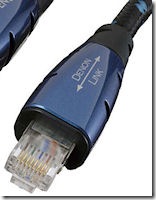
Denon is now selling a 5 foot Ethernet like cable for $500.00. Either Denon’s engineer’s are totally incompetent for designing a digital audio link that requires a $500 cable to work over 5 feet or, Denon’s marketing and management are jumping on the take money from gullible audiophiles bandwagon. Either situation is very bad, you don’t want to buy incompetently designed or fraudulent products.

denon1Take a look at the data sheet, it is completely devoid of electrical specifications, all it has is the usual range of pseudo-scientific marketing phrases. The biggest laugh I got from the data sheet is this bullet point. “Direction marks to indicate correct direction for connecting cable” and the picture shows a double headed arrow printed on the connector shell. The symbol clearly shows that you can connect the cable in either of the two possible ways making the symbol completely unnecessary. Another laugh is their labeling of the strain relief bushing in the head shell as a “bush”. Sorry Denon you don’t even have a firm grasp of the English language, a bush is plant type not a strain relief device.

I am very disappointed in Denon and in my opinion they have become snake oil salesman. I recommend that people do not even consider buying any gear from these hucksters. Any company willing to stoop this low is one to stay far away from if you value your money.

This article about the cable has some spot on observations and reasonable reader comments. My favorite phrase from the article is this, “Not made of solid gold and unicorn hair then”.

How to do an invalid benchmarking test

A post on a mail list pointed me to a what was supposed to be a good benchmark test posted on a blog. The test is Ubuntu 8.04 LTS vs. Windows XP SP3: Application Performance Benchmark. I read down through the report and some of the results seemed a little odd. Then I get to the end where the equipment and software details are laid out and see this:

  • HDD (Windows XP): Western Digital, WD1600JD, Capacity:160GB, Cache: 8 MB, SATA150, 7200rpm.
  • HDD (Ubuntu 8.04): Maxtor DiamondMax 21, STM3160215A, Capacity:160GB, Cache: 2MB, ATA100, 7200rpm.

Talk about poor test design, XP and Ubuntu are running from two different disk drives from two different manufacturers. On top of that they are on totally different interface busses and have different size drive caches. It boggles my mind how someone can spend their time doing a benchmark and totally invalidate the results by giving the two OS’s different hardware to work with, duh. I guess this next bit from the details shouldn’t have surprised me.

  • I also disabled RAM swapping on both Windows XP and Ubuntu.
  • OK, you change the OS suppliers recommended default setting to a non-recommended setting and you think you’ll get a fair test, double duh. If you want to do a fair test of two competing OS’s you absolutely must use the same hardware for both OS’s and use the OS’s recommended performance settings. Anything else is ridiculous and completely invalidates the results.