We-care.com doesn't seem to care about users
The Malware Survival blog has discovered that we-care.com is serving up bucket loads of malware to its users.
Blog vs. Post = Magazine vs. Article
I’m getting very annoyed at a re-definition that is becoming popular. Many people on the internet are now using the noun blog to refer not only to a web log but also to the individual posts within a web log. This is just like referring to the articles within a magazine as magazines, it’s ridiculous.
From what I’ve found the trend started with MySpace, rather than have a button that said post article, entry, or page they made their new entry button say post blog.
Everyone please stop trying to confuse the situation, use the word blog as it is defined. Refer to the individual entries in a blog as either, posts, entries, articles, stories, pages or one of the many existing synonyms.
Firefox 4 Upgrade Tips
I’ve been using and promoting Firefox since  the beginning when it was named Phoenix back in 2002. The browser has improved steadily in 8-1/2 years getting better with every release. The availability of version 4.0 this week brings major improvements in speed and usability, so naturally I had to upgrade. Since I didn’t participate in the beta testing and I also didn’t read up enough on this version, my version 4 experience was not what I’d anticipated.
This brings up my first tip, update your video driver or check the MozillaWiki to make sure your driver version is OK. I had very old Nvidia drivers so Firefox had to turn off the some of its new features. This made Firefox 4 not seem much faster than version 3.6 for page rendering. Once I updated my video drivers the performance improvements where definitely noticeable.
With my video driver updated I gave Firefox 4 a good workout on dozens of web sites I frequent and I’m very impressed with the rendering and JavaScript speed improvement over version 3.6. However as I played around with new features I hit a major crash problem that nearly made me roll back to 3.6. After logging out of Google Reader,  and when opening some other pages, the loading icon showed that the page would never finish loading. When I closed the loading tab and then went to close Firefox the confirm close dialog said that Firefox thought I had more tabs open than where visible.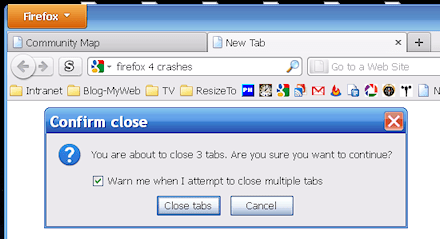
A few times Firefox even got stuck so badly I had to terminate it from task manager. Searching the support site and checking everywhere with Google I couldn’t find anyone else having this problem.
Following normal troubleshooting procedures I first disabled all my extensions and plug-ins to see if any of them was causing the problem, nope the problem persisted. I began to suspect there was something defective in the profile I was using. I’d been keeping this profile through all the upgrades since 2006 so it seemed quite possible it was corrupt in some obscure way. So I fired up my newest and cleanest profile, success, it did not have the problem. With my suspicion confirmed, I backed up my old profile, deleted it in profile manager then made a new profile with the old name. I repeated this for all my older profiles and they all now work flawlessly with Firefox 4. So my second tip is, if you have any problems after upgrading an ancient profile, nuke it and start fresh.
My next tip only applies if you are running Windows XP, turn on the new Firefox Button (it’s on by default in Vista/Win7). It replaces the standard menu freeing up a lot of screen space, see this article for details. Finally you may be wondering what happened to the Status bar, it’s now called the Add-on bar and Firefox 4 is really designed to run with it turned off freeing up more screen real estate.
The old status bar function of showing the target of links is now provided by a small pop-up at the bottom of the screen, very nice. Most plug-ins that put there control icons in the status bar can now have their icons in the navigation toolbar, so most people no longer need to have the add-on bar visible. There are a couple of exceptions, the Xmarks and Zotero plug-ins that for now need to use the add-on bar. To eliminate all the blank space in the add-on bar I’m using the Barlesque plug-in, it shrinks the bar to the minimum size needed and allows you to quickly hide the rest when you want to free up even more screen space.
Now that I’ve used Firefox 4 for a few days I’m comfortable saying this is the best Firefox ever! I recommend everyone upgrade today.
Cell Phone Jammer News
The FCC’s enforcement actions against illegal jammers continues, IN Compliance magazine has the details, Commission issues citations for marketing of cell phone jammers.
The FCC’s Herculean Task
The FCC has a nearly impossible duty that seems to be growing out of control, stopping the sale and usage of signal jammers. Somehow I missed the story when it was in the FCC daily digest last month but this week I saw it in this article from IN Compliance magazine.
Last month the FCC issued a citation to Everbuying.com for selling GPS jammers, FCC Citation No.: C201132340002. Clearly the Chinese owners of the site have no intention of complying with US law since they are still offering many different jammers at Everbuying.com. All of the products offered on those two pages are illegal to import, sell or use in the USA and most, if not all, other countries.
A Google Search for the product description from the citation yields 75,500 results and most of the top results are sites that will sell you the illegal device. I can not think of any legitimate use for a GPS jammer and the comments at DealExtreme’s Product Forum clearly show why people would buy these devices.
it’s great for stealing tracked trucks, and ‘sell’ them back latter
From Taylor73: My job uses a handheld device that has a L1 GPS device within it. Most of the time I’m pretty honest but every now and then I leave work early or might be late to where I’m supposed to be.
So, as far as I can see the people who buy and use these devices are either criminals or dishonest employees looking to screw over their employer. It seems to me that straight forward fairly simple statistical analysis of the data collected by the employer can discover the fraudulent activity of the employee. So I wouldn’t be surprised if Taylor73 is looking for a job in the near future.
Here are a few older posts of mine about jammers:
Hooray for Vista UAC
Like most tech guys I provide technical support for a number of PCs belonging to family and friends. After two years of no malware infections on the Vista PCs, and multiple infections on XP PCs, I finally had my first Vista infection to clean up. My forensics found that the malware was a new variation of the System Tool 2011 executable contracted via OkCupid on Christmas morning. Because I’d taken advantage of all the User Account Control (UAC) features on the Vista PCs I support, the damage was minor and easily repaired.
My experiences over the past several years have taught me to not even bother trying to start removing malware using only the infected PC. I always open the infected PC’s case and attach its hard disk to my system with a SATA/IDE to USB 2.0 Adapter. Scanning the USB attached drive with Microsoft Security Essentials it found no problems. Sadly this is frequently the case for me, the bad guys are constantly evolving their malware, so there usually is a few days to a week between the malware release and when detection systems are updated.
Next I searched the drive for files that where updated or created within 48 hours of the infection being noticed. This found the malicious software and what turned out to be its only other damage a shortcut in the start menu’s startup group. At first I was puzzled by the small scale of the infestation because on XP/2K/98/95 PCs I’ve repaired it has always been much worse. So I updated Malwarebytes and had it check the drive for me. It only found the same two items as my time based search and while it was scanning it dawned on me that UAC had prevented this malware from getting its hooks deeply into the system.
I saved a copy of the malware in my quarantined collection then deleted it and its shortcut from the drive. Next I reassembled the Vista PC and booted it up, no problems showed up and a manual check of the registry found no trace of the bad stuff. Just to be certain I installed and ran Malwarebytes from all the user accounts and it found no problems. The final step was to check the internet history to figure out where the malware came from, this showed me that it came from either Facebook of OkCupid. Later research points strongly to the malware coming from OkCupid via an advertising feed. I gave the PC back to its owner and Vista is running fine again.
The last thing I needed to do was report the malware to the Microsoft Malware Protection Center so that they could update their detection system. I submitted it and received confirmation of receipt Mon 12/27/2010 1:25 AM. They acknowledged the malicious nature of the software and changes to detection where in testing on Tue 12/28/2010 9:26 PM. The case was closed and new definitions released on Wed 12/29/2010 12:17 AM, less than 48 hours after I submitted it.
More Information on the System Tool 2011 malware:
- Encyclopedia entry RogueWin32Winwebsec – Microsoft Malware Protection Center
- Screenshots and removal @ the Tee Support Blog
- Google Search
Concentricity vs. Runout
What is the relationship between concentricity and runout? I keep seeing this question come up on the net and very few places seem to give the correct answer. Usually the discussion gets bogged down and confused by people adding in circularity and/or parallelism of 3D objects and somehow people end up saying that they are numerically equivalent or no conversion is possible.
The correct answer is concentricity is one half of the runout value. Don’t believe me, here’s how George Schuetz of Mahr Federal Inc. explains it in his paper “TIR Versus Concentricity for Coaxiality“.
Simply put, and ignoring any error in form or alignment, the TIR check bases its coaxiality reading on diameters, while the concentricity check calculates radii.
See, it’s diameter versus radius, one half. Still don’t believe it, see if this description makes more sense to you.
Although it is never written this way, concentricity is a bilateral measurement (+/-). Think about it, a shaft and attached disc centered at the origin with a concentricity error on the disc of +1 unit. When you rotate the shaft 180° the error is now -1 unit. However TIR is always a unilateral measurement, so the +/-1 becomes +2/-0.
Still not grokking this, then look at this 2D graphical representation (click image for full size).
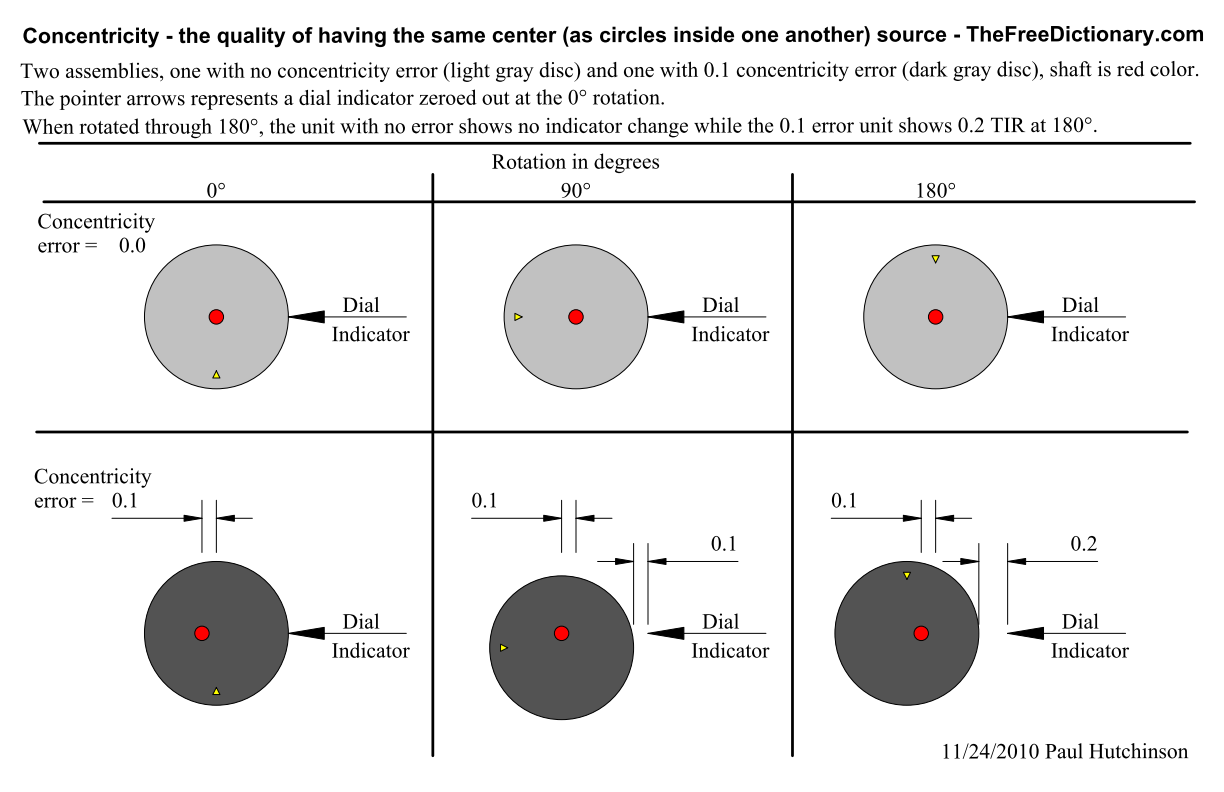
Hopefully this clears up the confusion, and you get the basic geometric rule. Concentricity error is exactly one half of the runout error. Still don’t believe it, then try it for yourself in your favorite CAD program or with a physical 2D model.
2021-11-06: A reader has informed me that the error of concentricity is properly referred to as eccentricity. Since eccentricity is the antonym of concentricity that makes sense to me, but since the post has been up for 11 years I’m leaving the main body as is.
Google Earth News & Map Data Sources
I’ve been using Google Earth version 5.2.1.1329 (beta) for some time and I find the measurement tab of the path properties dialog very useful. Another very handy feature appears when you right click on a path, the Show Elevation Profile option creates a nice interactive elevation chart.
I stumbled upon a good resource for free online historical maps the other day, Maps ETC from the University of South Florida. In addition to the nice maps they also provide some good basic tutorial videos for Google Earth.
While I was updating some of my Blackstone Valley places files I discovered the Map of all coordinates from Google link on a Wikipedia National Register of Historic Places list article. Clicking the link plots all the sites in Google Maps, but if you click the show link over to the right you get more mapping options. One of the options, Export all coordinates as KML, lets you load the place locations directly into Google Earth.
I decided to load up all the Wikipedia data for Massachusetts and Rhode Island, wow, there are a lot of sites. So I made a version limiting the places to those that fall within the boundary of the Blackstone River Valley National Heritage Corridor.
Most of the sites are not positioned precisely so, I’m tweaking the positions as I work on exploring the BRVNHC. During a recent editing session I found that the National Register of Historic Places provides Google Earth files with some locations updated with more accurate TeleAtlas data. Loading these files along with my my custom file helps in locating the historic sites.
One feature I’m editing into the files I have not found a way to do through GE itself. This is setting the placemark style variations for normal versus highlighted. I’ve set the style so that normally there is no label but when you point to the placemark the label appears and the icon grows. You get this effect by setting up the style block like this:
<StyleMap id="msn_star">
    <Pair>
        <key>normal</key>
        <styleUrl>#sn_star</styleUrl>
    </Pair>
    <Pair>
        <key>highlight</key>
        <styleUrl>#sh_star</styleUrl>
    </Pair>
</StyleMap>
<Style id="sn_star">
    <IconStyle>
        <Icon>
            <href>http://maps.google.com/mapfiles/kml/shapes/star.png</href>
        </Icon>
    </IconStyle>
    <LabelStyle>
        <scale>0</scale>
    </LabelStyle>
</Style>
<Style id="sh_star">
    <IconStyle>
        <scale>1.2</scale>
        <Icon>
            <href>http://maps.google.com/mapfiles/kml/shapes/star.png</href>
        </Icon>
    </IconStyle>
</Style>
With no scale parameter specified for an IconStyle the default value is 1, and with no LabelStyle parameter the label scale defaults to 1.
RSS for Traditional Web Pages
This method no longer works because Google removed the Note in Reader feature. See this new post for a better method that I wish I’d found before starting to use the method outline in this post.
I wanted to create an RSS feed for a section of my main web site so that regular visitors can find new or changed content easily. With blogs, and other types of sites based on a CMS, this feature is usually automatic. However my main pages are traditional manually created HTML so I would have to roll my own RSS generation. Reading up on RSS I learned it is fairly straight forward to do this, but it is labor intensive which means over the long haul there is no way Id keep up with it.
Then I found a great article on how to use Google Reader along with Googles FeedBurner service to make this task far less labor intensive. The easy to follow instructions are at the Digital Inspiration site in this article, Tutorial Create RSS Feeds for your Website.
 Paul Hutchinson's Blog