Users have discovered a rather severe calculation bug in Excel 2007. Some calculations that should result in 65,535 as a result end up giving 100,000. This could really screw me up if this slipped in to the middle of a long chain of calculations. I’m really glad now I decided to move to OpenOffice rather than upgrade to MS Office to 2007.
This week in EE Times
I read a couple of articles in this weeks EE Times that may be of interest to non-EE’s as well.
The first is about a pending war of the serial interfaces, USB 3.0 guns for Firewire. The print edition also contains a drawing of the new cable core for USB 3.0. The new cable has six additional conductors to accommodate the new two channel physical layer. I didn’t see any indication of what the new connectors will look like but, since they are leaving the existing four USB 2.0 conductors intact, it should be possible to make backwards compatible connectors. IEEE-1394 (Firewire) is also in the process of speeding up the transfer rates to about the same as USB 3.0. Firewire has an advantage in that its cable and connector system does not need to be changed to get the higher rate. Since USB 3.0 has 3 parallel serial channels maybe they should rename it UPSB, on second thought that sounds like a discount delivery service. 🙂
The other article is about how measurement and analysis methods from Electronics help predict global warming.
Some good mainstream Rachel Carson and DDT coverage
On this weeks Bill Moyers Journal they had nice coverage of the Rachael Carson and DDT topic, you can watch and/or read the transcript online. They also have a good article on their blog “E.O. Wilson on Rachel Carson” more show information here.
In the blogosphere, Tim and Bug Girl both pointed out a good new post by Aaron Swartz at FAIR , “Rachel Carson, Mass Murderer?“. Also, I’ve been pointed to more good posts on this topic by Millard Fillmore’s Bathtub, see DDT and Rachel Carson .
Of course there is always tons of great info this topic via Tim of Deltoid here and Bug Girl here, here and, here.
How much Camel cash to get this?
The first week of October, Comedy Central is premiering new episodes of both South Park (Wed, Oct 03 10:00p / 9:00c) and Drawn Together (Thurs, Oct 4 10:30p / 9:30c)
I was watching a rerun of the season two episode “Foxxy vs. The Board of Education” when I saw this flash by in the scene at the cartoon hospital, classic Drawn Together humor.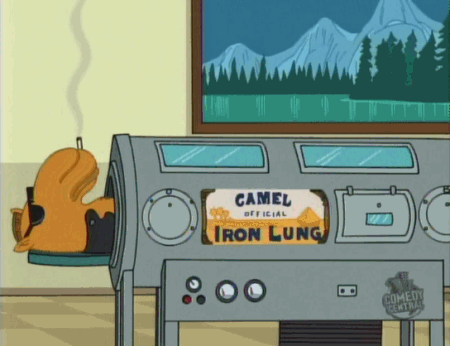
The Rev. Moon and his Unification Church
Ed Brayton has been writing a series of articles for the Michigan Messenger on the Rev. Moon and his church entitled “Bad Moon Rising”. I remember when the Moonies first appeared in the US I was around 15. I thought they were just another silly cult that wouldn’t go far and would hopefully disappear. My Dad, an American Baptist minister at the time, told me he thought they’d be around a long time and he was concerned about their potential to cause problems here in the US. Well after reading Ed’s three articles I have to say, Dad, you were right.
FCC and CPSC news
Via Conformity magazine, Radio Operator Fined for Failing to Make Equipment Available for Inspection. This is important for US citizens to remember, if the FCC requests access to your property to investigate an interference claim, you are required to admit them. Failure to do so leaves you open to large fines, Mr. Winston could have avoided this $7000.00 fine if he had cooperated. Here’s the FCC’s forfeiture order for this case.
Most of the time I write about the FCC coming down hard on companies and individuals. For a change of pace here’s a case where the FCC is being very nice to an offender. The FCC issued a citation to Surveillance-Video.com for selling illegal wireless cameras. The cameras were operating at 1.2GHz which is a clearly restricted band allocated for aeronautical navigation systems. The company stopped selling the cameras as soon as they were notified of the violation so, the FCC did not fine them. The lesson here is, if your selling electronic devices and the FCC says stop, don’t resist, don’t hesitate, just stop selling them and cooperate as much as you can with the FCC. This will help you prevent receiving a big forfeiture order from them.
OK, I guess this needs to be said, THERE IS NO SUCH THING AS A LEGAL JAMMER. This is one of the very few areas of FCC regulation that is simple, nobody is allowed to jam radio signals of any kind. If you build, import or sell any type of jammer you can be fined if caught. Read about the latest actions on this issue over at Conformity.
Finally, the latest list of notable CPSC recalls is up at Conformity Magazine.
Little Fish Hobby Stuff
On the LTSpice mail list a while back someone asked about a HiFi Power Amp found on the Little Fish Hobby Stuff web site. Go take a look at the site, I think you’ll be as impressed as I was with the exceptional skill and careful design that went into these hobby projects. Very nice job Suzy!
Custom quick launch pop-up menu for XP
I wanted to have a pop-up menu on my taskbar for accessing my Wizmo shortcuts. Rather than use an add-on program I wanted it to use just the standard OS supplied resources. When not activated it looks like the first image. All you see of it is a – and a >>, clicking the >> pops up a menu like the second image.

When not activated it looks like this. All you see of it is a – and a >>,

clicking the >> pops up a menu like this.
Here’s how I created it:
-
Create a directory to hold all the shortcut’s you want in the menu (e.g. C:Utilities-). The name of the directory will be seen on the taskbar, in this example the name is “-“.
-
Place all your shortcuts in the directory.
-
Left click on the taskbar, choose “Toolbars – New Toolbar…”
-
In the dialog that comes up, select the directory and select OK.
I’ve skipped over the basics of locking/unlocking the toolbar and setting it’s options, some instructions from Microsoft are here: Windows XP: Unlock Toolbars to Customize Them. One key option you need set for the custom toolbar to function as a pop-up menu is to have the “Show Title” option selected for the toolbar. You also need to shrink the toolbar size as much as possible to avoid seeing the toolbar’s icons in the taskbar.
Here are some links to sites with more info on customizing the taskbar and its toolbars:
Customize the Windows Taskbar
Create Your Own Custom Taskbar Toolbar
Customize Toolbars And Taskbar > Add New Toolbar
Windows XP: Customize the Taskbar
Comments closed 7/18/08 to slow the spam
Keeping an application out of the recent programs list
I’ve grown to like the recent programs list in XP but, I use WIZMO by Steve Gibson often to close drives and eject removable media and I don’t want it showing up in the list. Also, I have desktop or quick launch shortcuts for many programs that I use frequently so, I don’t want them in the list either.
Right clicking on an item in the recent programs list lets you pin it to the menu so that it is always up top but there is no option to exclude it from the list. Searching around I found the solution in a Microsoft Knowledge Base Article , a simple registry edit will prevent a program from appearing in the recent programs list. Here’s the instructional text from the article:
WARNING: If you use Registry Editor incorrectly, you may cause serious problems that may require you to reinstall your operating system. Microsoft cannot guarantee that you can solve problems that result from using Registry Editor incorrectly. Use Registry Editor at your own risk.
1. Start Registry Editor (Regedit.exe).
2. Add an empty string value named NoStartPage to the following registry key, where Program name.exe is the name of the executable file that is used to start the program:
HKEY_CLASSES_ROOTApplicationsProgram name.exe
3. Quit Registry Editor, and then restart the computer
In searching for the recent programs exclusion solution, I stumbled onto information that I have never found at any of Microsoft’s sites. This tip solves a somewhat annoying situation that I hadn’t tried fixing yet, programs never appearing in the list of the open with dialog.
Tip: Show Programs in the Open With Selection Box
This setting allows you to decide which programs are listed in “Open With” dialog box which is shown when an unknown file type is opened. Go to Start/Run/Regedit and navigate to this key: [HKEY_CLASSES_ROOTApplications]
To stop a specific application appearing in the “Open With” list select the associated sub-key and create a new empty string value called “NoOpenWith”. To allow an application to be shown in the list delete the “NoOpenWith” value. Restart Windows for the change to take effect.
In that list of tips I also spotted a command line utility built into XP that I hadn’t looked at before. The description on that tips page isn’t clear to me so I’ll write my own description here. The program is named “ASSOC”, as with all good command line programs for Windows, if you enter ASSOC /? at a command prompt you get the usage instructions, which say:
Displays or modifies file extension associations
ASSOC [.ext[=[fileType]]]
.ext Specifies the file extension to associate the file type with
fileType Specifies the file type to associate with the file extensionType ASSOC without parameters to display the current file associations. If ASSOC is invoked with just a file extension, it displays the current file association for that file extension. Specify nothing for the file type and the command will delete the association for the file extension.
This is handy for getting a list of all currently assigned file associations, simply enter:
ASSOC >C:Assoc.txt
at a command prompt or,
CMD /C ASSOC >C:Assoc.txt
in the “Start-Run…” dialog and you’ll get a text file list to review.
Boston freaks out again
An MIT student wearing her electronic art hoody is arrested by the foolish authorities who don’t seem to know what a bomb looks like. After the Mooninite fiasco you’d think they would get a clue. I guess we’re all just going to have to try to think like idiots so that our pretty flashing art projects don’t get us hauled in by the brain dead authorities in Massachusetts. With this low of an intelligence level I have zero confidence that these bozo’s will be able to prevent an actual bomb plot if it happens in Boston.
For a good pictures and more details read the articles here and here.
 Paul Hutchinson's Blog