Firefox 4 Upgrade Tips

I’ve been using and promoting Firefox since firefoxnytadthe beginning when it was named Phoenix back in 2002. The browser has improved steadily in 8-1/2 years getting better with every release. The availability of version 4.0 this week brings major improvements in speed and usability, so naturally I had to upgrade. Since I didn’t participate in the beta testing and I also didn’t read up enough on this version, my version 4 experience was not what I’d anticipated.

This brings up my first tip, update your video driver or check the MozillaWiki to make sure your driver version is OK. I had very old Nvidia drivers so Firefox had to turn off the some of its new features. This made Firefox 4 not seem much faster than version 3.6 for page rendering. Once I updated my video drivers the performance improvements where definitely noticeable.

With my video driver updated I gave Firefox 4 a good workout on dozens of web sites I frequent and I’m very impressed with the rendering and JavaScript speed improvement over version 3.6. However as I played around with new features I hit a major crash problem that nearly made me roll back to 3.6. After logging out of Google Reader, ffloadingiconand when opening some other pages, the loading icon showed that the page would never finish loading. When I closed the loading tab and then went to close Firefox the confirm close dialog said that Firefox thought I had more tabs open than where visible.FFcrash01
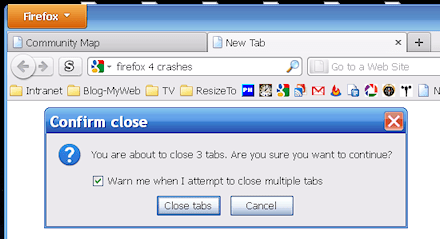
A few times Firefox even got stuck so badly I had to terminate it from task manager. Searching the support site and checking everywhere with Google I couldn’t find anyone else having this problem.

Following normal troubleshooting procedures I first disabled all my extensions and plug-ins to see if any of them was causing the problem, nope the problem persisted. I began to suspect there was something defective in the profile I was using. I’d been keeping this profile through all the upgrades since 2006 so it seemed quite possible it was corrupt in some obscure way. So I fired up my newest and cleanest profile, success, it did not have the problem. With my suspicion confirmed, I backed up my old profile, deleted it in profile manager then made a new profile with the old name. I repeated this for all my older profiles and they all now work flawlessly with Firefox 4. So my second tip is, if you have any problems after upgrading an ancient profile, nuke it and start fresh.

My next tip only applies if you are running Windows XP, turn on the new Firefox Button (it’s on by default in Vista/Win7). It replaces the standard menu freeing up a lot of screen space, see this article for details. Finally you may be wondering what happened to the Status bar, it’s now called the Add-on bar and Firefox 4 is really designed to run with it turned off freeing up more screen real estate.

The old status bar function of showing the target of links is now provided by a small pop-up at the bottom of the screen, very nice. Most plug-ins that put there control icons in the status bar can now have their icons in the navigation toolbar, so most people no longer need to have the add-on bar visible. There are a couple of exceptions, the Xmarks and Zotero plug-ins that for now need to use the add-on bar. To eliminate all the blank space in the add-on bar I’m using the Barlesque plug-in, it shrinks the bar to the minimum size needed and allows you to quickly hide the rest when you want to free up even more screen space.

Now that I’ve used Firefox 4 for a few days I’m comfortable saying this is the best Firefox ever! I recommend everyone upgrade today.


American Antiquarian Society Receives Save America’s Treasures Grant

The American Antiquarian Society located in Worcester Massachusetts has been awarded a $77,557 grant. From the announcement:

The American Antiquarian Society’s collection of early American imprints (pre-1876) is recognized as the most comprehensive for this period and includes the first books printed in the colonies. Funds would support conservation treatment with an emphasis on retaining the original character and physical appearance of the materials. Fragile volumes would also be housed in lignin-free clamshell boxes.

Congratulations!

Hopedale in Some Newspaper Stories

I spotted a couple of interesting mentions of Hopedale in newspaper stories via my saved Google news searches. The first is an article in the Cape Cod Times by Rev. Robinson:

The theory of nonviolence has its roots in the ethic of Jesus, but as a technique for social transformation, it began with a Universalist minister, Adin Ballou, in the mid-19th century here in Massachusetts. Ballou was the spiritual head of a utopian community in Hopedale, located in the Blackstone River Valley. He was a Christian socialist, and when many of his fellow socialists were advocating violent means in the struggle against capitalism, Ballou championed nonviolence.

Ballou was Leo Tolstoy’s favorite American author, and Tolstoy took up Ballou’s ideas of nonviolence. Mohandas Gandhi, in turn, read Tolstoy, and Martin Luther King Jr. read Gandhi.

I was not aware of the Rev. Ballou’s influence on Tolstoy’s thinking.

The other story is sad, it’s by Joe O’Connell of the Milford Daily News, “Developmentally disabled from Hopedale clubhouse to protest cuts to clubhouses”. It makes me sad that we are reducing our level of help to our most vulnerable citizens.

The FCC’s Herculean Task

The FCC has a nearly impossible duty that seems to be growing out of control, stopping the sale and usage of signal jammers. Somehow I missed the story when it was in the FCC daily digest last month but this week I saw it in this article from IN Compliance magazine.

Last month the FCC issued a citation to Everbuying.com for selling GPS jammers, FCC Citation No.: C201132340002. Clearly the Chinese owners of the site have no intention of complying with US law since they are still offering many different jammers at Everbuying.com. All of the products offered on those two pages are illegal to import, sell or use in the USA and most, if not all, other countries.

A Google Search for the product description from the citation yields 75,500 results and most of the top results are sites that will sell you the illegal device. I can not think of any legitimate use for a GPS jammer and the comments at DealExtreme’s Product Forum clearly show why people would buy these devices.

it’s great for stealing tracked trucks, and ‘sell’ them back latter

From Taylor73: My job uses a handheld device that has a L1 GPS device within it. Most of the time I’m pretty honest but every now and then I leave work early or might be late to where I’m supposed to be.

So, as far as I can see the people who buy and use these devices are either criminals or dishonest employees looking to screw over their employer. It seems to me that straight forward fairly simple statistical analysis of the data collected by the employer can discover the fraudulent activity of the employee. So I wouldn’t be surprised if Taylor73 is looking for a job in the near future.

Here are a few older posts of mine about jammers:

Quack Miranda Warning

In case you aren’t aware, the Quack Miranda Warning takes the form of:

These statements have not been evaluated by the FDA. This product is not intended to treat, cure or prevent any disease.

This statement is required on health products when the manufacturer and seller either are unable or unwilling to show the product is useful the way normal health products show their usefulness. It provides the manufacturer/seller some immunity from legal liability. So to protect your health and/or prevent wasting money on useless products all you have to do is avoid buying any product that bears this warning. Be aware that, like all fine print meant to protect undeserved profits, this warning will be in a tiny font in the most obscure location of a page.

It used to be that you’d only see this warning on diet pills, weird vitamins and other things you’d ingest. This warning has worked so well at limiting liability that pretty much all useless products relating to health in any way shape or form now include the warning. Case in point, xZubi, the warning is in the smallest font at the bottom of the home page.

I find the easiest way to check for the warning is to search any suspect page for the phrase “evaluated by the FDA” (Firefox & Internet Explorer, press Control+F to search a page) .  I hope this information helps you avoid wasting money or damaging your health, Happy New Year 2011.

Hooray for Vista UAC

Like most tech guys I provide technical support for a number of PCs belonging to family and friends. After two years of no malware infections on the Vista PCs, and multiple infections on XP PCs, I finally had my first Vista infection to clean up. My forensics found that the malware was a new variation of the System Tool 2011 executable contracted via OkCupid on Christmas morning. Because I’d taken advantage of all the User Account Control (UAC) features on the Vista PCs I support, the damage was minor and easily repaired.

My experiences over the past several years have taught me to not even bother trying to start removing malware using only the infected PC. I always open the infected PC’s case and attach its hard disk to my system with a SATA/IDE to USB 2.0 Adapter. Scanning the USB attached drive with Microsoft Security Essentials it found no problems. Sadly this is frequently the case for me, the bad guys are constantly evolving their malware, so there usually is a few days to a week between the malware release and when detection systems are updated.

Next I searched the drive for files that where updated or created within 48 hours of the infection being noticed. This found the malicious software and what turned out to be its only other damage a shortcut in the start menu’s startup group. At first I was puzzled by the small scale of the infestation because on XP/2K/98/95 PCs I’ve repaired it has always been much worse. So I updated Malwarebytes and had it check the drive for me. It only found the same two items as my time based search and while it was scanning it dawned on me that UAC had prevented this malware from getting its hooks deeply into the system.

I saved a copy of the malware in my quarantined collection then deleted it and its shortcut from the drive. Next I reassembled the Vista PC and booted it up, no problems showed up and a manual check of the registry found no trace of the bad stuff. Just to be certain I installed and ran Malwarebytes from all the user accounts and it found no problems. The final step was to check the internet history to figure out where the malware came from, this showed me that it came from either Facebook of OkCupid. Later research points strongly to the malware coming from OkCupid via an advertising feed. I gave the PC back to its owner and Vista is running fine again.

The last thing I needed to do was report the malware to the Microsoft Malware Protection Center so that they could update their detection system. I submitted it and received confirmation of receipt Mon 12/27/2010 1:25 AM. They acknowledged the malicious nature of the software and changes to detection where in testing on Tue 12/28/2010 9:26 PM. The case was closed and new definitions released on Wed 12/29/2010 12:17 AM, less than 48 hours after I submitted it.

More Information on the System Tool 2011 malware:


Concentricity vs. Runout

What is the relationship between concentricity and runout? I keep seeing this question come up on the net and very few places seem to give the correct answer. Usually the discussion gets bogged down and confused by people adding in circularity and/or parallelism of 3D objects and somehow people end up saying that they are numerically equivalent or no conversion is possible.

The correct answer is concentricity is one half of the runout value. Don’t believe me, here’s how George Schuetz of Mahr Federal Inc. explains it in his paper “TIR Versus Concentricity for Coaxiality“.

Simply put, and ignoring any error in form or alignment, the TIR check bases its coaxiality reading on diameters, while the concentricity check calculates radii.

See, it’s diameter versus radius, one half. Still don’t believe it, see if this description makes more sense to you.

Although it is never written this way, concentricity is a bilateral measurement (+/-). Think about it, a shaft and attached disc centered at the origin with a concentricity error on the disc of +1 unit. When you rotate the shaft 180° the error is now -1 unit. However TIR is always a unilateral measurement, so the +/-1 becomes +2/-0.

Still not grokking this, then look at this 2D graphical representation (click image for full size).

ConcentricityVsTIRlg

Hopefully this clears up the confusion, and you get the basic geometric rule. Concentricity error is exactly one half of the runout error. Still don’t believe it, then try it for yourself in your favorite CAD program or with a physical 2D model.

2021-11-06: A reader has informed me that the error of concentricity is properly referred to as eccentricity. Since eccentricity is the antonym of concentricity that makes sense to me, but since the post has been up for 11 years I’m leaving the main body as is.