I was given a new PC at work this week. It has Microsoft Office 2003 which I have been avoiding using for years. I first used Office 95 and moved up through 97 to 2000 as each was released. When Office XP and 2003 came out I looked them over but found there to be no useful features for me vs. 2000 so I passed on the upgrades. The majority of changes in the new versions are UI changes that for me typically cause more down time learning than they are worth. Of course being an engineer I do most of my work in text editors and CAD programs so I tend to prefer very basic easy to use office applications (IMHO, AmiPro 3.0 was the best word processor ever).
The one Microsoft Office application that I use all the time is Outlook. Outlook 2000, and 97 before it, have worked very well for me. I rely on the e-mail, calendar and contact functions ever day and I know how to fix its occasional quirky actions. Over all these years using OL2000 I’ve become very efficient in using a particular configuration for Outlook. With the default Outlook 2003 configuration I was lost so, I set about changing the configurations to try and make it the way I like. I did get it setup to my preference but along the way I hit a number of annoying roadblocks.
The first problem I hit was e-mail account setup. I have seven e-mail accounts setup that I export from OL2K to IAF files for configuring the three workstations I use Outlook on. I was shocked that Microsoft had removed IAF file import from Outlook. Not wanting to manually enter all that configuration information I searched the net and found the solution here.
Import IAF configuration file to an Outlook 2003 / Outlook XP
I just cant fathom why the heck Microsoft would take this feature out of their flagship e-mail product but keep it in their free product. I guess I’ll just not upgrade my other workstations so that I’ll only have to use the IAF support in OE on that one workstation.
The next very annoying problem is not a Microsoft caused annoyance but rather an Adobe Acrobat created annoyance. IT also put the full Acrobat 7 program on the new PC. This put a PDF toolbar and top level menu in Outlook. The annoying part is that when you remove them in Outlook they come right back when you restart OL, screwing up the toolbar layout in the process. I found a number of solutions on the net (sorry lost the links) but the best one is to simply run the add/remove process for Acrobat and uninstall the Outlook integration option. I actually removed all the integration options, I guess Im old fashioned but to me it’s easiest to just use a PDF printer driver.
I like to have OL open up with Outlook Today. Well OL2003 has an annoying bug when you simply copy over an OL2000 pst file. Heres the solution from Outlook 2003 – Today Screen Problem
Go to the Outlook Today screen.
Right click on Personal Folders – Outlook Today.
Select Properties for Outlook Today.
Go to the Home Page Tab.
Click Restore Defaults.
The new default calendar view was not to my liking because it was missing the two nice navigation calendars I’m used to. To get them back select view Taskpad and move the window divider until you can see the two navigation months.
The next item I tried to change back to 2000 standard was to eliminate the icon that 2003 puts in the system tray. It turns out there is no way to remove the icon so I’ll just have to live with it. On an XP system you can hide the icon, here’s the Microsoft info: Hide the Outlook icon in the notification area of the taskbar I hate the hide function so I didn’t bother trying it.
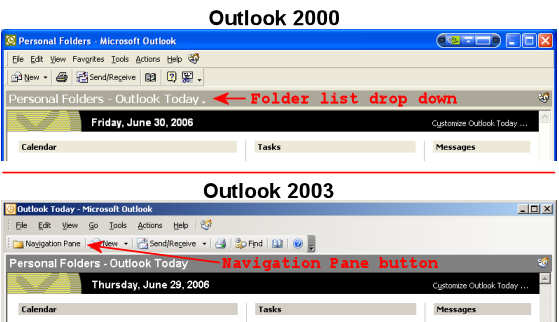
The last thing that bugged me was their removal of the built-in folder list drop down with pinning. I worked around the missing button by adding a Navigation Pane button just above where the old button was. This is a toggle button so for myself it is just as functional as the old button. You’ll get a better idea of what I did in this 2000 vs. 2003 picture.
Another annoyance is one the IT guys fixed before giving me the PC. The default setup causes Messenger to open with Outlook. I think IT did a registry hack to stop Messenger but in my searches I discovered this site with a nice clean way to fix this annoyance. Removing Outlook 2003s Dependence on Windows Messenger If you go to the Options Form and select the Other tab, the last section is labeled Person Names. If you uncheck the Enable the Person Names Smart Tag option, Outlook will no longer mysteriously start up Windows Messenger.
There is one feature in OL2003 that I think is great! I set it to only show e-mail as plain text, if only they’d had this feature back in 98 I would have avoided the one and only virus infection I’ve had since starting to use PC’s in 1982.
 Paul Hutchinson's Blog