Catholic League Announces Plan for Large Scale Copyright Infringement

The announcement is here:

We are now getting copies made for a mass mailing later this week. We will send a copy of this episode to 414 bishops, and to hundreds of influential Catholic, Protestant, Jewish, Orthodox Christian, Muslim and Mormon religious leaders across the United States. We will also send a copy to hundreds of activists and members of the media.

Not only are they promising to break the law in their statement, they are already violating the law by posting the Penn & Teller video here. This blatant disregard for copyright law from a religious organization is despicable. With the enormous wealth of their organization and church they should obey the law and buy the right to distribute the video.

I support copyright law, I believe it currently lasts too long hurting the public domain but, it is important that creators have control over their creative works. Large scale piracy always makes me mad and when an organized group such as the Catholic League publicly announces their intention to violate copyright law I hope that they are prosecuted. Of course I doubt Showtime or their parent company CBS will file an infringement suit. The negative publicity is probably not worth it and, after all it is their intellectual property and only they can decide how to handle the situation.

If the Catholic Church wants to show they have some morals left, they will immediately make a public announcement condemning this action by the Catholic League. I won’t hold my breath for it. While I am incredibly tolerant of religious beliefs, as Roger Williams taught, over the past few decades the actions of Catholics and particularly their leadership has forced me to believe that the Catholic Church is no longer an institution worthy of any respect or tolerance. If they really cared about people they would have insisted that Cardinal Bernard Law be put on trial for his alleged actions in helping hush up so much child sexual abuse. Instead they sent him to the Vatican where he is protected from the legal consequences of his past actions.

Hat tip to the Friendly Atheist for pointing me towards this story via the J-Walk Blog.

Interactive Time Lines

I was trying to estimate the date/time for undated events in an 18th century travel diary. Realizing it would help to use OOCalc for date time math such as daily totals and speed estimates, I set up a spreadsheet for the purpose. As I worked on the spreadsheet I thought it would be great to see a time line graph to check my work for errors. Searching around it became clear that none of the built-in graphing functions in spreadsheets would work for creating a time line graphic. It appears that most people simply use drawing tools to make time lines.

Then I found the Simile Widgets Timeline component a versatile JavaScript based solution. Soon after I got a time line going it became clear that keeping the data file in sync with the changing spreadsheet data was cumbersome. With all the data already in OOCalc I decided it would be nice to output formatted data directly from the spreadsheet for use in the timeline.

With my success in creating a spreadsheet for this one project I decided to create a generic version of the spreadsheet that covers all time line attributes. The spreadsheet contains a final version of my custom Calc functions for time line JSON data creation that handles all time line data options (download the spreadsheet here). To test out my new OOCalc functions I created a time line of English and British Monarchs (also useful for my research) starting with my spreadsheet sample. I haven’t finished adding text excerpts to the monarchs time line but it does have pictures and Wikipedia links for all items.

Last month while organizing notes from a tour of historic sites I found I had not recorded the dates and times in the notes. As I was giving myself a dope slap for failing to record the times it dawned on me that the photos I took would give me the missing time information. While I was viewing the photos to get the times from the EXIF data it occurred to me that I could set up nearly automatic time line generation using my spreadsheet and the command line ExifTool.

To start you open a command prompt in the directory with your photos and then run the following command line.

"C:Program FilesEXIFtoolexiftool.exe" -p "$filename, $createdate" -q -f -d "%Y/%m/%d %H:%M:%S" . >PhotoTimes.csv

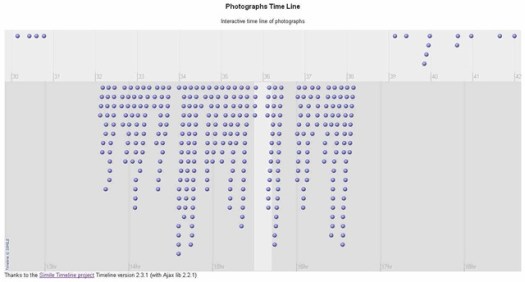
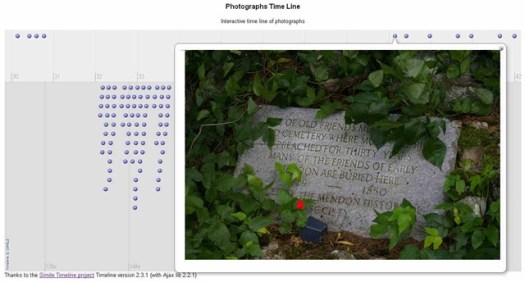
This creates a CSV data file containing the image filename and creation date that can be opened by OOCalc. Using the spreadsheet you generate a JSON data file to give you a time line as shown in these screenshots.
TimelineScreenshot1

TimelineScreenshot2

I’ve put a zip archive with the files used to create the photo time line on my site. Download the archive from this link.

The archive contains these files for the Photographs Time Line:

PhotoTimes.csv output from the ExifTool run
PhotoTimeline.ods spreadsheet for creating the JSON data file
PhotoTimes.js the JSON data file
PhotoTimes.html HTML page for displaying the time line
PhotoTimes.css CSS for better control of image size

See Also:

Simile Widgets Timeline documentation
OpenOffice Calc Tips

It’s been two years since I switched from MS Office to OpenOffice for all my word processing, spreadsheet, presentation and local database needs. I had been using OpenOffice for all my personal documents for a number of years prior and with the advances in Calc’s functionality I was pretty sure it could handle my professional work as well.

After two whole years I can confidently say that OpenOffice Calc does everything I need as well or better than MS Office. Over this period, due to changed business needs, I’ve had to spend more time with spreadsheets than in the previous ten years. With the much heavier usage I was concerned that I would eventually hit a need for some feature of Excel that is not yet implemented in Calc. To my delight I have not found any missing features and my employer got a productivity bonus because I haven’t had to spend time learning the new Microsoft UI.

Lately I’ve gotten around to writing custom functions for Calc and had quite a bit to learn because this is the one area where decades of 123 and Excel experience is not much help. I’ve put some tips and custom functions in a Function Demos Spreadsheet that you can download. One spreadsheet feature that I’ve found to be essential for long term maintenance, that most people don’t use, is named ranges. If you haven’t used named ranges in Calc spreadsheets I recommend reading the tips linked at the end of this post.

Recently I needed to work with a Calc document I had constructed a year and a half ago. While I had used named ranges extensively making it easier to read the formulas, I wanted to change the range names as the abbreviations I had used weren’t as clear as I’d like. With dozens of named ranges defined across multiple sheets and each used on other sheets it wasn’t going to be easy to edit them one at a time. to manually edit a couple range names all you have to do is:

  1. Go to the menu item Insert->Names->Define .
  2. Select the Name you want to change.
  3. Copy the range definition from the Assigned to text box.
  4. In the name text box change the name.
  5. Paste the range definition in to the Assigned to text box.
  6. Then click the add button, you now have two names for the range, click OK to close the dialog.
  7. Use Edit->Find & Replace to change the old name in formulas to the new name.
  8. Go to the menu item Insert->Names->Define .
  9. Select the old name and click the delete button.

While this process is workable for changing a few names, it’s faster to do than to describe in text, it is not really efficient when you’ve got dozens of names to change. To aid with managing the multiple changes I created a custom array function that creates a list of all named ranges, it’s in the Function Demos Spreadsheet. After entering the array function in a new sheet, select the whole array and use the Data->Text to Columns… function to make the name list static. Next copy the name list to the column to the right, and edit that column to the new names you want to use. You now have a neat two column list of old and new range names that you can use to copy and paste names from for the Insert->Names->Define and Edit->Find & Replace dialogs.

General Info

Range Names Tips

Other Tips

Feynman's Messenger Lectures online

Bill Gates has purchased the videos and Microsoft Research has put them online, from the about page.

Microsoft Research Project Tuva presents Nobel Prize winning physicist Richard Feynman’s Messenger Series lectures within a new video player. This enhanced video player features searchable video, linked transcripts, user notes, and interactive extras.

More information at these web pages:
TierneyLab @ The NY Times
PC Pro
Stimulant
Artefact

Tip of the hat to Alan for pointing me to this.

Google Earth Tips

I’ve been using Google Earth (GE) a lot recently for my amateur cartography addiction (it’s been a problem for over 40 years, GE is like crack to me ;-)). In the process I’ve hit upon a couple of tips that don’t seem to be widely mentioned. The first tip is a way to get the length of a path or a polygon perimeter. All you need to do is [Update for GE 5.2]copy the object to the clipboard, paste it into this Google Earth Tool and, click calculate look on the Measurements tab of the objects Properties dialog

The second tip is a bit more complicated it’s how to change a polygon into a path. I created an area boundary as an unfilled polygon which seemed the right way to go. Later I discovered that a polygon blocks all the paths under its area from being clickable for the pop-up information balloons. So I wanted to change the polygon to a path so that the other paths within the boundary area still had their pop-ups. Searching around there where quite a few people who had accidentally created polygons while making a path and no solutions were given. A feature of GE is that if you move the end point of a path near to the start point, it snaps to the start point and becomes a polygon automatically. If that’s not what you wanted and you don’t notice before hitting “OK” you lose your path and there is no option in GE to undo it.

I figured that since GE files are simply XML you should be able to edit the XML to change a polygon to a path so I tried it and it works. All you need to do is right click the polygon and choose “Save Place As”. Change the “Save as type:” to “KML (*.kml)” give it a name and save it. Now open the file in a plain text editor, my current favorite is Notepad++. Simply change the <Polygon> tags to <LineString> tags and remove the <outerBoundaryIs> and <LinearRing tags>. After I had spent a fair bit of time testing out this solution I found the same solution in a Google Groups search. Lesson here for me, don’t skimp on the searches, always include groups and blogs if you don’t find a web search answer.

Firefox 3.5 image issue

Firefox 3.5 is a nice update to my favorite browser. Of course as usual when Firefox gets updated some extensions won’t work until the author updates it or you hack the installer. The speed improvement in the JavaScript engine is very noticeable and worth any upgrade frustration.

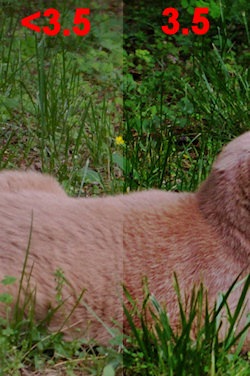
There is one issue I encountered is some jpeg images being shown too dark and with the contrast too high like this:

FirefoxColorProblem

This is due to the new color profiles support being enabled by default while there is still a bug in the implementation. to work around the issue change the gfx.color_management.mode config option from the default of 2 to 0. This will get images back looking the way they do in other browsers and previous versions of Firefox. If you don’t know how to change advanced options in Firefox see the instructions here.

Once they’ve fixed the bug I’m hoping the color profile support will work OK but, there is a caveat listed at the Gfx.color_management.enabled page.

Without a properly calibrated monitor and a correct color profile, color management may actually make colors look worse.

I’m keeping my fingers crossed but, I really don’t know how well calibrated most monitors are or if they have a proper color profile installed. Hopefully I won’t need to edit all the photos in my album to make it work correctly. If it comes down to that I think Ill just add a note saying “To see the photos properly you can’t use Firefox 3.5, every other browser, including older versions of Firefox, work fine”, ouch.

More info and opinions:

http://www.flickr.com/help/forum/en-us/99676/

http://hacks.mozilla.org/2009/06/color-correction/

Now I see why the jury upped the fine

The 1.9 million dollar fine issued against Jammie Thomas-Rasset came as a big surprise to me since I hadn’t been following the case. Then I read the six part coverage of the trial at Ars Technica starting with, Jury selected in Thomas retrial: shockingly law-abiding. If I had read those articles before the verdict the fine would not have surprised me. Frankly I’m surprised the defense lawyers didn’t settle the case earlier given what came out at trial.

Much of the media coverage of this case has once again mistakenly called this a case of prosecution for downloading. It was no such thing, it, like all the other cases that I’ve looked at, was about file sharing. Jammie’s IP address was caught sharing files via KaZaA.

MediaSentry presented its evidence of having caught the tereastarr@KaZaA user sharing files; the company downloaded complete copies of 11 songs from that user and grabbed the metadata on nearly 2,000 more. Source: Sony lawyer: $150K damages per song “certainly” appropriate – Ars Technica

My advice to everyone, if you are sharing copyrighted music via a file sharing program/network and you get a notice from the RIAA lawyers, take the settlement, it is tiny compared to the fines you get from losing at trial. Jammie was offered a settlement for 5 thousand dollars when they first caught her IP address sharing.

If you’re positive you are not sharing music but receive an RIAA notice, stop using the PC and get experts on the case immediately. It is possible for the RIAA investigators to be fooled by spoofing or other people tapping into your LAN but that is a rare enough occurrence that a court is not likely to side with you unless you provide strong evidence.

Happy Birthday Monsieur Pascal

Blaise Pascal was born June 19, 1623 in Clermont-Ferrand, France. Pascal was a truly great mathematician, physicist, and philosopher. I see his name all the time in my work because the SI unit of pressure is the pascal.

Over at Rationally Speaking Massimo Pigliucci has a post with a nice quote from Monsieur Pascal.

Men never do evil so completely and cheerfully as when they do it from religious conviction.

The Wikipedia entry for Monsieur Pascal I find to be excellent so I’ll send you there for more about this giant of science.

Why did it take so long? FDA Orders Zicam Nasal Off the Market

You’ve probably seen this story at many blogs recently.

FDA Advises Consumers Not To Use Certain Zicam Cold Remedies

The U.S. Food and Drug Administration today advised consumers to stop using three products marketed over-the-counter as cold remedies because they are associated with the loss of sense of smell (anosmia). Anosmia may be long-lasting or permanent.

The products are:
–Zicam Cold Remedy Nasal Gel
–Zicam Cold Remedy Nasal Swabs
–Zicam Cold Remedy Swabs, Kids Size (a discontinued product)

While this is good news, what took so long for the FDA to act on this? As pointed out at What’s The Harm? What’s the harm in homeopathy? (Lisa Weatherington & 339 others) Zicam settled a lawsuit over this issue nearly 3 1/2 years ago.

By Sandra G. Boodman
Washington Post Staff Writer
Tuesday, January 31, 2006

The manufacturer of Zicam Cold Remedy has agreed to pay $12 million to settle 340 lawsuits brought by consumers who claim the popular over-the-counter zinc nasal gel damaged or destroyed their sense of smell.

Full article: Paying Through the Nose – washingtonpost.com.

Did the FDA really need over three years to act on this problem? Are the 130 injured mentioned in the FDA notice in addition to the 340 from the 2006 lawsuit?

Lets see, the science has shown a potential problem since 2004 and further documented in 2006, the manufacturer settles a lawsuit in 2006, then finally the FDA acts in 2009. The FDA should have acted much sooner!

For some interesting additional information info on the men behind the company see: The Men Behind Zicam – washingtonpost.com.

FDA links: