I started having problems with ods files located on my NAS today. The problem only occurs when I try to open them from Windows Explorer, any other method works fine. The bug seems to have been tracked down to the LibreOffice Explorer extensions just like an older bug that also caused excessive network reading on my NAS as a symptom. The easiest fix is the same as for a bug from a year ago that I blogged about at the time.
Enable Recent Documents List in Windows 7
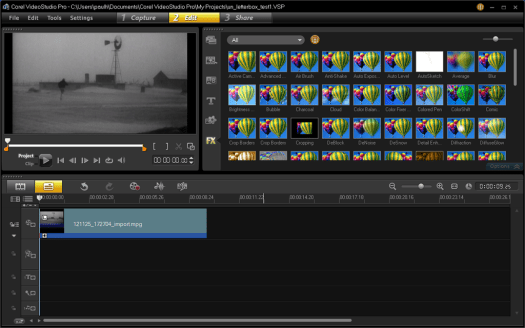
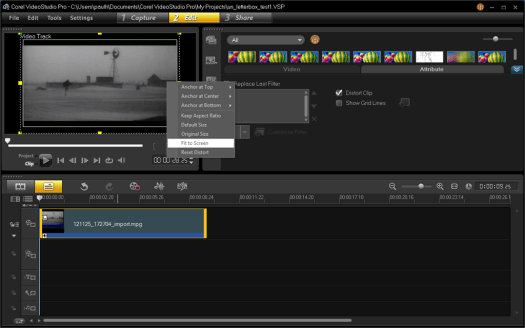
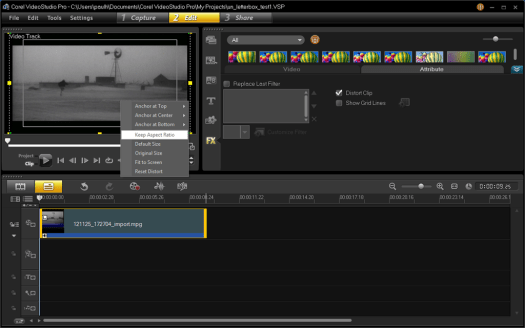
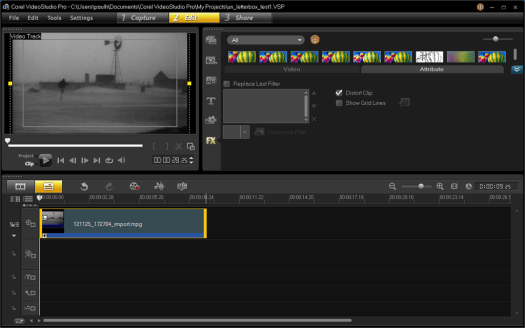
Rather than use text and screen shots I thought Id try out the screen capture function of VideoStudio Pro X5.
Convert letterboxed video to widescreen in Corel VideoStudio X5
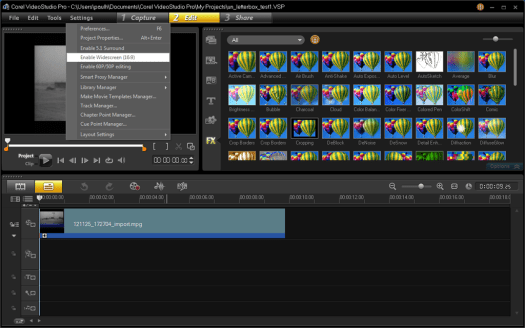
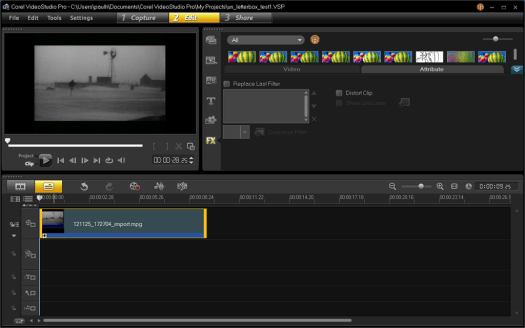
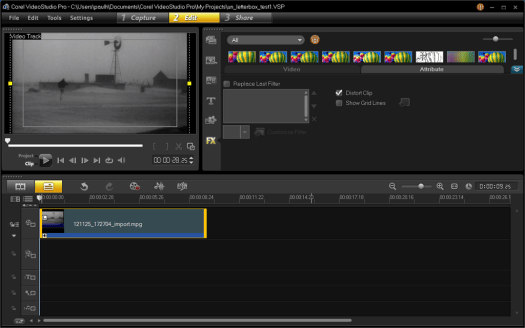
There is a great web page by Trevor Andrew about working with 16:9 video in Corel VideoStudio 10. In particular I needed to use the section about 3/4 of the way down the page titled “Ok let’s change a 4:3 aspect ratio to 16:9“. I wanted to crop a 16:9 video that was captured in letterboxed 4:3 format and I’m using Corel VideoStudio X5, so the screen shots and some option locations are different. Here are screen shots and modified steps to make Trevor’s page match X5 exactly.
Differences are in parenthesis, my VSP X5 changes are in bold italics
- Change the project properties to use 16:9 aspect (File – Project Properties-Edit-General tab) (Settings – Enable Widescreen)
- With the 4:3 video in the top track select the (‘Attributes Tab’. Select the “Distort” button.) (Open the Options panel, Select the Attributes Tab and check the Distort Clip checkbox)
- Right click the preview screen and select “Fit to screen”
- Right click the preview screen and select “Keep aspect ratio”
My First Earthquake
I felt my first earthquake a few minutes ago, It was this one from the USGS site, centered in southern Maine. The house shook for a few seconds and nothing fell over but I must admit I was concerned enough that I headed down from the open plan second floor to shelter in a doorway. By the time I got down the stairs the shaking had stopped.
Cell Phone & GPS Jammer FCC News
Jamming devices are not only illegal they put others at risk, e.g. jammers can prevent timely response to a medical emergency. In its never ending battle to keep the radio spectrum functional for all of us the FCC has taken the following actions.
FCC ENFORCEMENT BUREAU ROLLS OUT NEW JAMMER TIP LINE: 1-855-55-NOJAM.
FCC ENFORCEMENT BUREAU TAKES ACTION AGAINST CRAIGSLIST SELLERS FOR MARKETING ILLEGAL SIGNAL JAMMING DEVICES.
Warns Consumers to Immediately Remove Online Jammer Ads; Issues Consumer Alerts in Spanish and Mandarin Chinese.
FCC ENFORCEMENT ADVISORY (TRANSLATIONS): CELL JAMMERS, GPS JAMMERS, AND OTHER JAMMING DEVICES, CONSUMER ALERT: USING OR IMPORTING JAMMERS IS ILLEGAL, MONETARY PENALTIES CAN EXCEED $100,000 PER VIOLATION.
The Enforcement Bureau Releases Chinese and Spanish Language Versions of an Enforcement Advisory Warning that Signal Jamming Devices May Not Be Advertised or Sold in the United States.
Word DOC , Word DOC, Word DOC, PDF, PDF, PDF, TXT, TXT, TXT
Official Citation to Scott Sandlin Word DOC, PDF, TXT
Official Citation to Keith Grabowsky Word DOC, PDF, TXT
Official Citation to Joseph Hundley Word DOC, PDF, TXT
Official Citation to George Conde Word DOC, PDF, TXT
Official Citation to John Bering Word DOC, PDF, TXT
Official Citation to Dancing Bear Technologies Word DOC, PDF, TXT
Variable time delay in a WinXP Batch File
I needed to pause for a varying amount of time in a batch file for a test today. Unfortunately WinXP has no built-in method of adding a time delay to a batch file. So I searched and found a commonly cited method of achieving a delay. Then I couldn’t remember how to increment a variable in a batch file, but again the answer was only a quick search away.
Putting them together I made this batch command file:
@REM Reset the target at a variable frequency starting @ 3 seconds

@REM

SET milliseconds=3000

:BEGIN

"C:Program FilesMicrochipMPLAB IDEProgrammer UtilitiesRealICERealICECMD.exe" -P18F87K22 -L

PING 1.1.1.1 -n 1 -w %milliseconds% > NUL

SET /A milliseconds=%milliseconds%+1

GOTO BEGIN
Each pass through the infinite loop adds 1 millisecond to the initial 3 second delay. To stop the batch file simply press Ctrl+C.
Another LibreOffice Fix
Most of the embedded systems I design output data in a CSV format for performance analysis, monitoring and debugging. So I add LibreOffice Calc to the CSV files “Open with” Explorer option for convenience. When moving from OpenOffice, or upgrading LibreOffice versions, the file association is sometimes broken do to left over registry keys pointing to the wrong place for scalc.exe.
In the past I would manually delete the left over entries using RegEdit, a rather slow and boring task. This post on the OO forum points out the easiest method of fixing this issue, using CCleaner. I like to use the portable version because I rarely run the program so by the time I want to run it again I need to get the latest version anyway.
LibreOffice 3.6 series causing Win7 Explorer Crashes
I really like LibreOffice so recently I upgraded to the 3.6 version on my Win7 64 Pro PC. Soon after upgrading I noticed some major slowdowns but since I was working on humongous data analysis spreadsheets I assumed it was my abuse of spreadsheets. The spreadsheets contain thousands of data points that are charted and have basic statistics calculated. Normally I’d take the time to do analysis and graphing in R but, since I don’t anticipate needing to re-run these analyses I got lazy and just used Calc.
Last night I noticed that when I opened one of the spreadsheets in Calc, Windows Explorer started continuously accessing my NAS file server. Even after closing Calc the network access continued and then Explorer crashed when I tried to use any explorer function (e.g. empty the recycle bin). After a re-boot Explorer was still doing the excessive network access but after a few minutes it stopped. So I tried just opening Calc without opening a spreadsheet from the file server. The problem started right up indicating that this was not a problem with massive spreadsheets as I had guessed.
This morning I decided to investigate more and discovered these two somewhat related problems in the LibreOffice bug list (weird, the bug list server went down as I was testing the links). It turns out there is a bug in the LibreOffice Explorer shell extensions DLL, some users recommended using the command line tool to un-register the DLL but, one user said he solved his problem by re-installing LibreOffice and disabling the shell extensions option. This made me think that the easiest way would be to use the change feature of the Windows Installer. I tried it out and it worked perfectly fixing the problem. Here are step by step screen shots of this easy way to fix this problem.
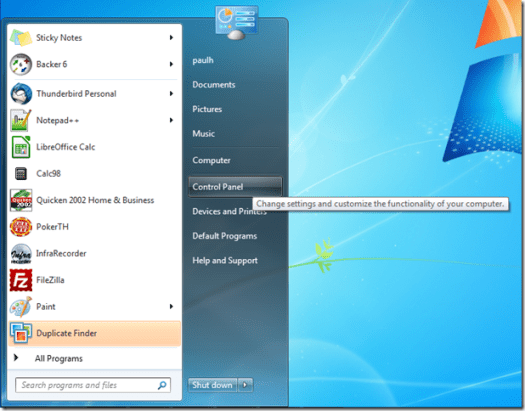
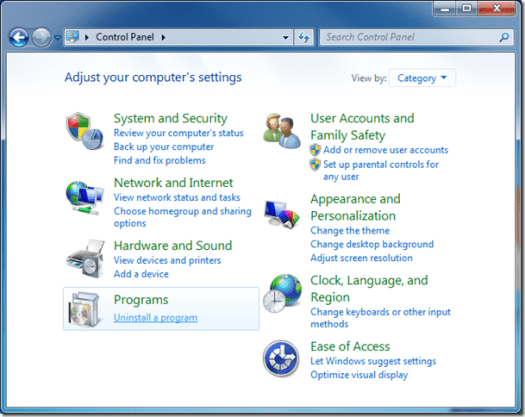
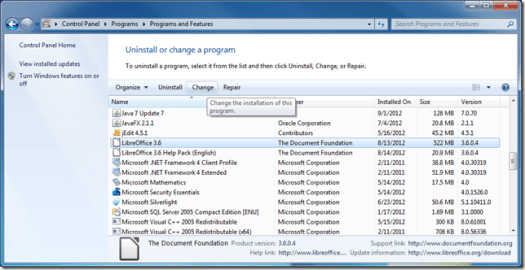
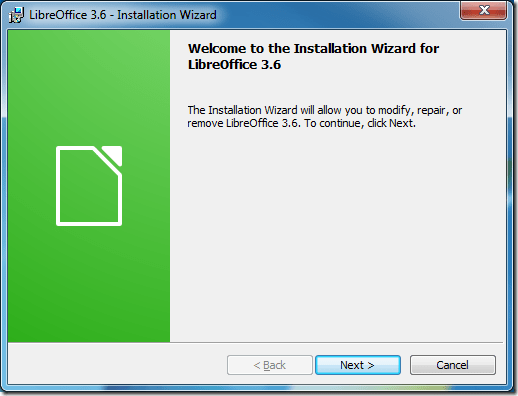
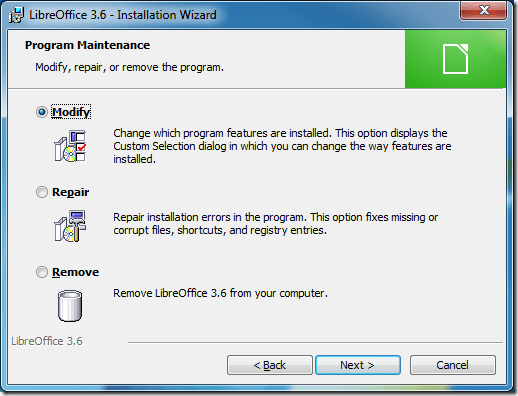
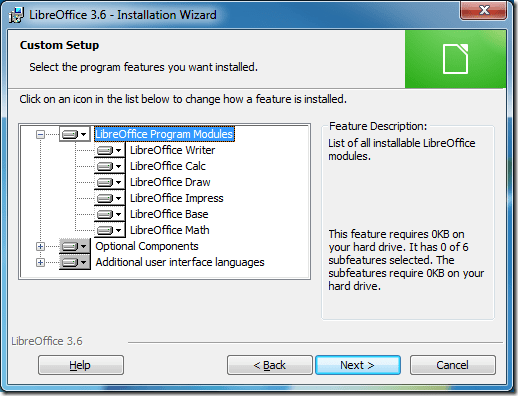
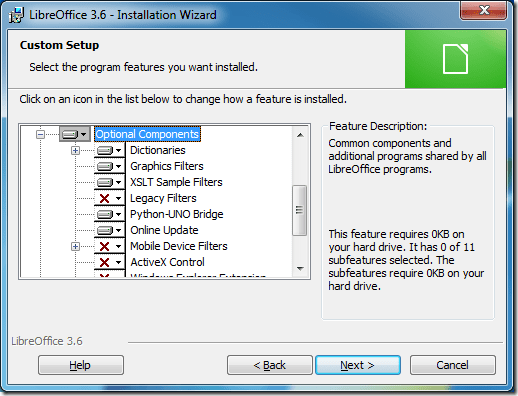
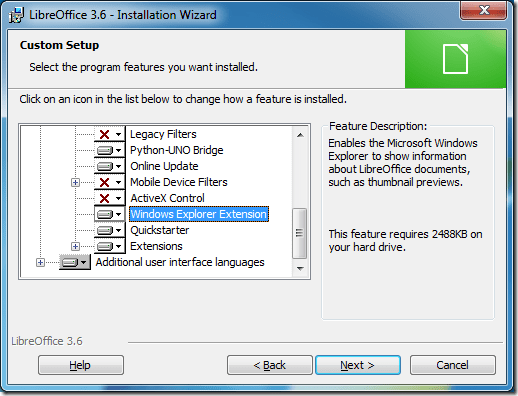
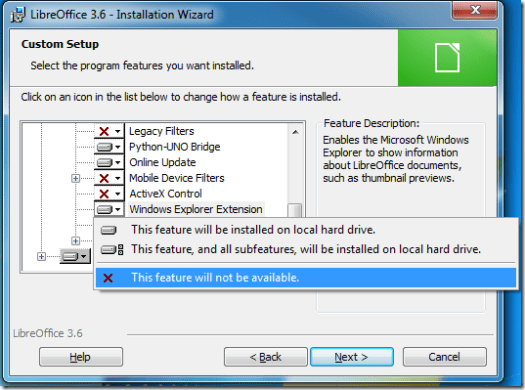
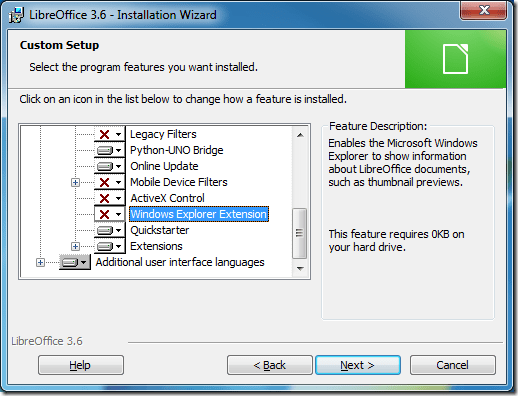
The rest of the steps should be obvious.
Old Quicken Registration Annoyance
When you install an old version of Quicken on a new PC, Quicken wants to register itself and make online services available. It can’t actually complete the registration so it gives up and asks for permission to retry every time you open Quicken.
To disable this you need to execute a hidden command, hold down Ctrl+Shift while selecting the One Step Update menu item. Quicken responds with a dialog that says “You will no longer be prompted for registration.”. The One Step Update menu item is located in the Finance menu for Quicken 2001-2002 and in the Online menu for Quicken 2003-2005.
I found this information here.
We had a Leap Second
Thanks to the Bad Astronomer I heard about the scheduled leap second yesterday before it happened. For most people on the planet this event should have been completely unnoticed. I however have been running timekeeping accuracy tests for a new product so it would affect the test results. Since I ‘m using a standard NTP time sync, not actually directly syncing with an atomic clock, I wasn’t sure what the error would be like. In fact just looking at the basic statistics from the logged data I couldn’t see the error. So I graphed the errors and the leap second effect became clearly visible.
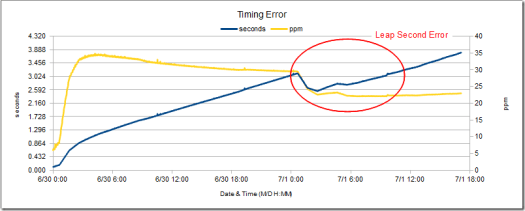
It looks like the NTP servers involved (there are multiple servers) changed the abrupt midnight UTC leap second adjustment into a gradual adjustment starting around midnight local time (EDT). Also note that leap second error fell within the already recorded error bounds which is why the basic statistics for the data didn’t show the leap seconds contribution. This reinforces my mantra when it comes to data analysis, simple graphing reveals far more about oddities of a data set than any numerical statistical analysis. Check out NIST/SEMATECH e-Handbook of Statistical Methods for many more examples of how graphs reveal more about data than numerical statistics.
 Paul Hutchinson's Blog