The preview feature of Windows Live Writer had never worked correctly for me. With the nice utility I got from Brandon Turner’s Donkblog post, Broken theme in Windows Live Writer? You can fix it!, I finally have it working perfectly.
My Favorite PC Keyboard
Earlier this year my trusty old keyboard died after a decade of use. I had a few different spare keyboards that had come with new PC’s over the years so I tried them all as replacements. They all felt wrong to my fingers that have grown accustomed to the original IBM PC and Selectric typewriter buckling spring keyboards I’ve been using for nearly forty years.
Searching around I found what seemed to be the closest match to the IBM style keyboards from Keytronic, the DESIGNER-P2. I bought one from Newegg unfortunately it was defective so with the added expense of shipping it back for replacement I ended up spending close to $60.00 before I had a functioning unit. Then came the big disappointment, it just didn’t have the buckling spring feel I wanted. While it is far better than the other keyboards I tried, it still fell short of my expectations.
After further searching I found the company that bought and still uses IBM’s keyboard technology, Unicomp of Kentucky. Through Unicomp’s online store I bought the SpaceSaver 104/105 model and I love it. The feel of the keys is exactly what I wanted and it has brought my typing speed and accuracy back to where it should be. The Keytronic keyboard is now packed away for use as a temporary replacement when my SpaceSaver 104/105 breaks and I’m waiting for a new one to arrive.
Texas Instruments has reached the heights of stupidity
The latest from the EFF:
it is scandalous that the company continues to send its improper demands to other bloggers and hosting companies. In fact, TI has sent an identical take-down demand to Mr. Smith’s university complaining about the same OS keys having been posted on our client’s student webpage, and demanding that the school take the materials down from that URL.
TI’s abuse of copyright law is disgusting, I’m starting to think I should set up a boycott Texas Instruments website. They clearly have no clue, are very likely breaking the law and obviously have nothing but contempt for their customers. In the meantime my personal boycott remains in effect, no new components, assemblies or other products of any kind from TI will be used in my work or home. I strongly encourage everyone else to boycott TI as well because what they are doing is far worse than the RIAA or MPAA. While I dislike the tactics of the RIAA and MPAA at least they are operating legally, whereas what TI is doing is almost certainly illegal.
EFF sends notice to Texas Instruments
As I mentioned before I am currently boycotting Texas Instruments because of what to me is behavior worse than the RIAA and MPAA. They are using fear of copyright law to suppress legal actions by customers when there is no copyright infringement. The EFF has sent a warning letter to TI that explains the situation clearly. I am glad that the EFF has taken on the defense of the people abused by TI. I will continue to boycott TI until they publicly apologize for their egregious actions.
Designers Please Boycott Texas Instruments
I’m boycotting Texas Instruments for all new designs I create until they pull their heads out of their butts and apologize to their customers for their stupid anti-consumer actions. Linear Technology, National Semiconductor and ON Semiconductor are now my preferred analog and power chip suppliers and I’ll go with Microchip, Zilog, Intel and Freescale Semiconductor for my microcontroller needs. I strongly encourage all other electronic designers to join me in boycotting TI products until they wake up and treat their customers fairly.
Briefly, TI has sent DMCA takedown notices to TI calculator owners who posted the keys needed to change the OS on certain calculators. This is almost certainly legally wrong since the DMCA has been ruled by the courts to not apply in a similar situation (Lexmark v. Static Controls). While TI has a lame excuse about keeping the calculators trustworthy it is ridiculous because they used weak fairly easily breakable encryption. If TI truly feels they need to keep users locked out, they need to make an effort and use a real lock not a toy lock. Whatever they want to accomplish, legal threats against their customers is not the right thing to do.
Read more about this at the EFF.
FCC issues formal smack down of a multiyear email hoax
Released September 17, 2009:
For several years there has been a rumor circulating, mostly by e-mail, that a nationwide directory of cell phone numbers will be made available to telemarketers, and that consumers will start receiving telemarketing calls on their cell phones.
There is no truth to this rumor. Cell phone numbers are not being released to telemarketers, and you will not soon be getting telemarketing calls on your cell phone. FCC rules prohibit the use of autodialers and prerecorded messages to call cell phones without the consumer’s consent. Thus, most telemarketers are barred from contacting consumers on their cell phones.
The e-mail spreading the rumor often suggests that consumers put their cell phone numbers on the National Do-Not-Call Registry by going on-line at http://www.donotcall.gov or by calling 1- 888-382-1222. This is the correct contact information for the National Do-Not-Call Registry. Consumers may register their cell phone numbers as an extra protection against unwanted telemarketing calls, although most telemarketing calls to cell phones would be illegal regardless of whether the number is listed on the Do-Not-Call Registry.
Original FCC message is here.
Interactive Time Lines
I was trying to estimate the date/time for undated events in an 18th century travel diary. Realizing it would help to use OOCalc for date time math such as daily totals and speed estimates, I set up a spreadsheet for the purpose. As I worked on the spreadsheet I thought it would be great to see a time line graph to check my work for errors. Searching around it became clear that none of the built-in graphing functions in spreadsheets would work for creating a time line graphic. It appears that most people simply use drawing tools to make time lines.
Then I found the Simile Widgets Timeline component a versatile JavaScript based solution. Soon after I got a time line going it became clear that keeping the data file in sync with the changing spreadsheet data was cumbersome. With all the data already in OOCalc I decided it would be nice to output formatted data directly from the spreadsheet for use in the timeline.
With my success in creating a spreadsheet for this one project I decided to create a generic version of the spreadsheet that covers all time line attributes. The spreadsheet contains a final version of my custom Calc functions for time line JSON data creation that handles all time line data options (download the spreadsheet here). To test out my new OOCalc functions I created a time line of English and British Monarchs (also useful for my research) starting with my spreadsheet sample. I haven’t finished adding text excerpts to the monarchs time line but it does have pictures and Wikipedia links for all items.
Last month while organizing notes from a tour of historic sites I found I had not recorded the dates and times in the notes. As I was giving myself a dope slap for failing to record the times it dawned on me that the photos I took would give me the missing time information. While I was viewing the photos to get the times from the EXIF data it occurred to me that I could set up nearly automatic time line generation using my spreadsheet and the command line ExifTool.
To start you open a command prompt in the directory with your photos and then run the following command line.
"C:Program FilesEXIFtoolexiftool.exe" -p "$filename, $createdate" -q -f -d "%Y/%m/%d %H:%M:%S" . >PhotoTimes.csv |
This creates a CSV data file containing the image filename and creation date that can be opened by OOCalc. Using the spreadsheet you generate a JSON data file to give you a time line as shown in these screenshots.
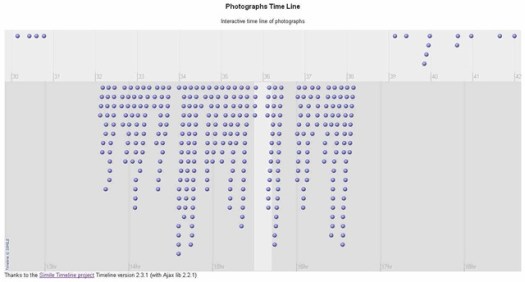
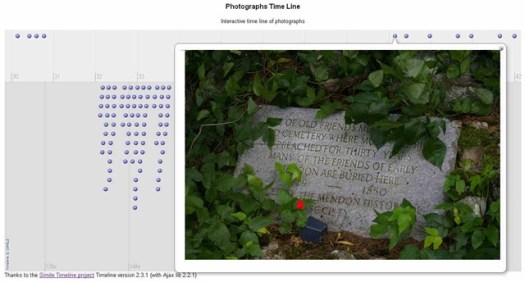
I’ve put a zip archive with the files used to create the photo time line on my site. Download the archive from this link.
The archive contains these files for the Photographs Time Line:
| PhotoTimes.csv | output from the ExifTool run |
| PhotoTimeline.ods | spreadsheet for creating the JSON data file |
| PhotoTimes.js | the JSON data file |
| PhotoTimes.html | HTML page for displaying the time line |
| PhotoTimes.css | CSS for better control of image size |
See Also:
OpenOffice Calc Tips
It’s been two years since I switched from MS Office to OpenOffice for all my word processing, spreadsheet, presentation and local database needs. I had been using OpenOffice for all my personal documents for a number of years prior and with the advances in Calc’s functionality I was pretty sure it could handle my professional work as well.
After two whole years I can confidently say that OpenOffice Calc does everything I need as well or better than MS Office. Over this period, due to changed business needs, I’ve had to spend more time with spreadsheets than in the previous ten years. With the much heavier usage I was concerned that I would eventually hit a need for some feature of Excel that is not yet implemented in Calc. To my delight I have not found any missing features and my employer got a productivity bonus because I haven’t had to spend time learning the new Microsoft UI.
Lately I’ve gotten around to writing custom functions for Calc and had quite a bit to learn because this is the one area where decades of 123 and Excel experience is not much help. I’ve put some tips and custom functions in a Function Demos Spreadsheet that you can download. One spreadsheet feature that I’ve found to be essential for long term maintenance, that most people don’t use, is named ranges. If you haven’t used named ranges in Calc spreadsheets I recommend reading the tips linked at the end of this post.
Recently I needed to work with a Calc document I had constructed a year and a half ago. While I had used named ranges extensively making it easier to read the formulas, I wanted to change the range names as the abbreviations I had used weren’t as clear as I’d like. With dozens of named ranges defined across multiple sheets and each used on other sheets it wasn’t going to be easy to edit them one at a time. to manually edit a couple range names all you have to do is:
- Go to the menu item Insert->Names->Define .
- Select the Name you want to change.
- Copy the range definition from the Assigned to text box.
- In the name text box change the name.
- Paste the range definition in to the Assigned to text box.
- Then click the add button, you now have two names for the range, click OK to close the dialog.
- Use Edit->Find & Replace to change the old name in formulas to the new name.
- Go to the menu item Insert->Names->Define .
- Select the old name and click the delete button.
While this process is workable for changing a few names, it’s faster to do than to describe in text, it is not really efficient when you’ve got dozens of names to change. To aid with managing the multiple changes I created a custom array function that creates a list of all named ranges, it’s in the Function Demos Spreadsheet. After entering the array function in a new sheet, select the whole array and use the Data->Text to Columns… function to make the name list static. Next copy the name list to the column to the right, and edit that column to the new names you want to use. You now have a neat two column list of old and new range names that you can use to copy and paste names from for the Insert->Names->Define and Edit->Find & Replace dialogs.
General Info
- OpenOffice Calc Tips
- OpenOffice.org Ninja: calc
- Tutorials For OpenOffice: CALC (spreadsheets) Category
- OpenOffice.org Training, Tips, and Ideas
Range Names Tips
- Using names for cell ranges
- Naming Multiple Cell Ranges
- Using named data ranges to have a more readable reference to items in formulas, in OpenOffice.org Calc spreadsheets
Other Tips
Google Earth Tips
I’ve been using Google Earth (GE) a lot recently for my amateur cartography addiction (it’s been a problem for over 40 years, GE is like crack to me ;-)). In the process I’ve hit upon a couple of tips that don’t seem to be widely mentioned. The first tip is a way to get the length of a path or a polygon perimeter. All you need to do is [Update for GE 5.2]copy the object to the clipboard, paste it into this Google Earth Tool and, click calculate look on the Measurements tab of the objects Properties dialog
The second tip is a bit more complicated it’s how to change a polygon into a path. I created an area boundary as an unfilled polygon which seemed the right way to go. Later I discovered that a polygon blocks all the paths under its area from being clickable for the pop-up information balloons. So I wanted to change the polygon to a path so that the other paths within the boundary area still had their pop-ups. Searching around there where quite a few people who had accidentally created polygons while making a path and no solutions were given. A feature of GE is that if you move the end point of a path near to the start point, it snaps to the start point and becomes a polygon automatically. If that’s not what you wanted and you don’t notice before hitting “OK” you lose your path and there is no option in GE to undo it.
I figured that since GE files are simply XML you should be able to edit the XML to change a polygon to a path so I tried it and it works. All you need to do is right click the polygon and choose “Save Place As”. Change the “Save as type:” to “KML (*.kml)” give it a name and save it. Now open the file in a plain text editor, my current favorite is Notepad++. Simply change the <Polygon> tags to <LineString> tags and remove the <outerBoundaryIs> and <LinearRing tags>. After I had spent a fair bit of time testing out this solution I found the same solution in a Google Groups search. Lesson here for me, don’t skimp on the searches, always include groups and blogs if you don’t find a web search answer.
Firefox 3.5 image issue
Firefox 3.5 is a nice update to my favorite browser. Of course as usual when Firefox gets updated some extensions won’t work until the author updates it or you hack the installer. The speed improvement in the JavaScript engine is very noticeable and worth any upgrade frustration.
There is one issue I encountered is some jpeg images being shown too dark and with the contrast too high like this:
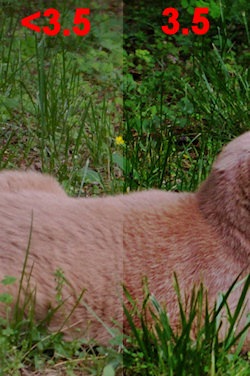
This is due to the new color profiles support being enabled by default while there is still a bug in the implementation. to work around the issue change the gfx.color_management.mode config option from the default of 2 to 0. This will get images back looking the way they do in other browsers and previous versions of Firefox. If you don’t know how to change advanced options in Firefox see the instructions here.
Once they’ve fixed the bug I’m hoping the color profile support will work OK but, there is a caveat listed at the Gfx.color_management.enabled page.
Without a properly calibrated monitor and a correct color profile, color management may actually make colors look worse.
I’m keeping my fingers crossed but, I really don’t know how well calibrated most monitors are or if they have a proper color profile installed. Hopefully I won’t need to edit all the photos in my album to make it work correctly. If it comes down to that I think Ill just add a note saying “To see the photos properly you can’t use Firefox 3.5, every other browser, including older versions of Firefox, work fine”, ouch.
More info and opinions:
 Paul Hutchinson's Blog