Variable time delay in a WinXP Batch File

I needed to pause for a varying amount of time in a batch file for a test today. Unfortunately WinXP has no built-in method of adding a time delay to a batch file. So I searched and found a commonly cited method of achieving a delay. Then I couldn’t remember how to increment a variable in a batch file, but again the answer was only a quick search away.

Putting them together I made this batch command file:

@REM Reset the target at a variable frequency starting @ 3 seconds
@REM
SET milliseconds=3000
:BEGIN
"C:Program FilesMicrochipMPLAB IDEProgrammer UtilitiesRealICERealICECMD.exe" -P18F87K22 -L
PING 1.1.1.1 -n 1 -w %milliseconds% > NUL
SET /A milliseconds=%milliseconds%+1
GOTO BEGIN

Each pass through the infinite loop adds 1 millisecond to the initial 3 second delay. To stop the batch file simply press Ctrl+C.

Another LibreOffice Fix

Most of the embedded systems I design output data in a CSV format for performance analysis, monitoring and debugging. So I add LibreOffice Calc to the CSV files “Open with” Explorer option for convenience. When moving from OpenOffice, or upgrading LibreOffice versions, the file association is sometimes broken do to left over registry keys pointing to the wrong place for scalc.exe.

In the past I would manually delete the left over entries using RegEdit, a rather slow and boring task. This post on the OO forum points out the easiest method of fixing this issue, using CCleaner. I like to use the portable version because I rarely run the program so by the time I want to run it again I need to get the latest version anyway.

LibreOffice 3.6 series causing Win7 Explorer Crashes

I really like LibreOffice so recently I upgraded to the 3.6 version on my Win7 64 Pro PC. Soon after upgrading I noticed some major slowdowns but since I was working on humongous data analysis spreadsheets I assumed it was my abuse of spreadsheets. The spreadsheets contain thousands of data points that are charted and have basic statistics calculated. Normally I’d take the time to do analysis and graphing in R but, since I don’t anticipate needing to re-run these analyses I got lazy and just used Calc.

Last night I noticed that when I opened one of the spreadsheets in Calc, Windows Explorer started continuously accessing my NAS file server. Even after closing Calc the network access continued and then Explorer crashed when I tried to use any explorer function (e.g. empty the recycle bin). After a re-boot Explorer was still doing the excessive network access but after a few minutes it stopped. So I tried just opening Calc without opening a spreadsheet from the file server. The problem started right up indicating that this was not a problem with massive spreadsheets as I had guessed.

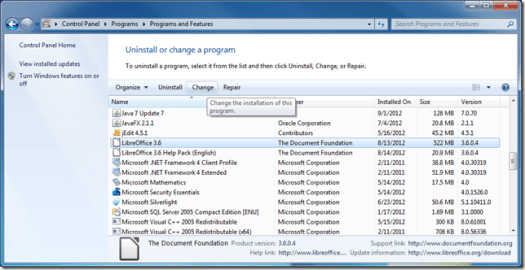
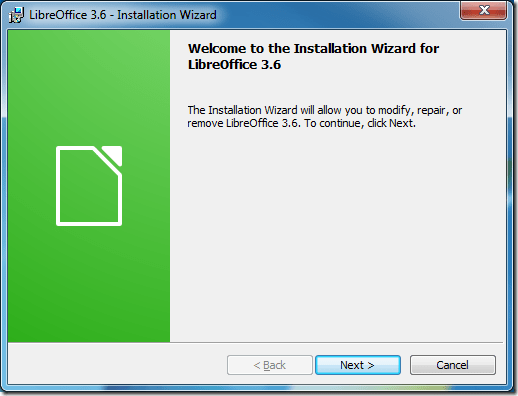
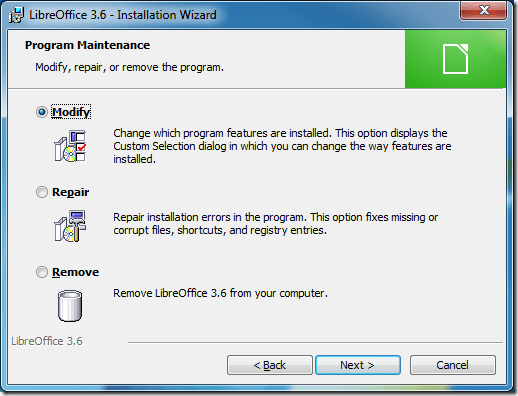
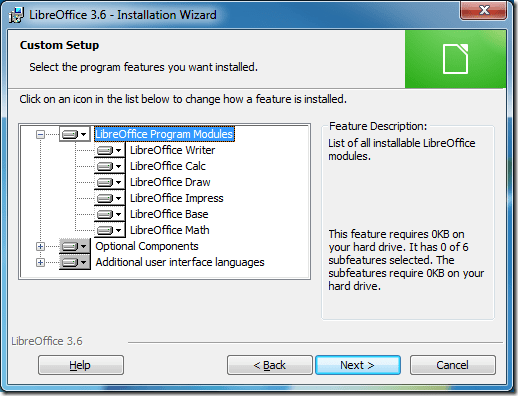
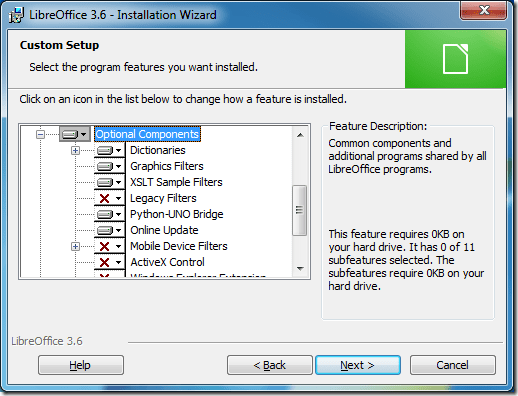
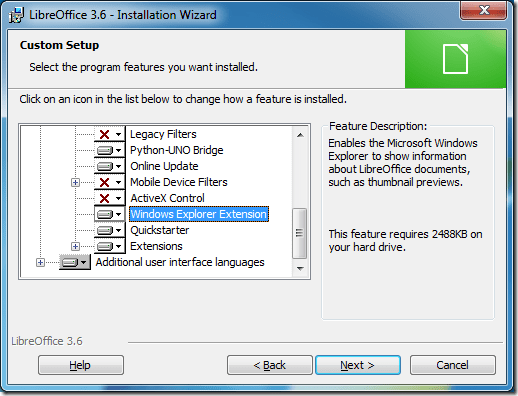
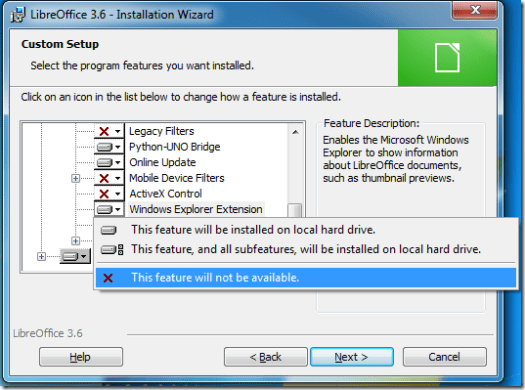
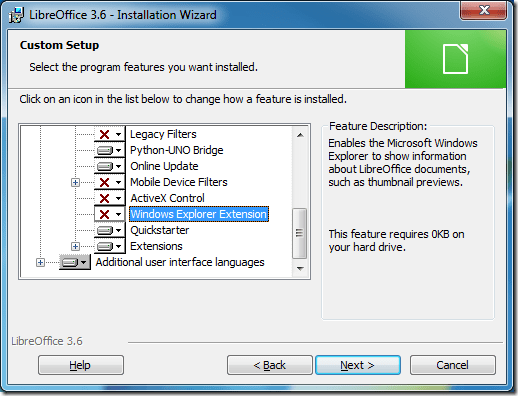
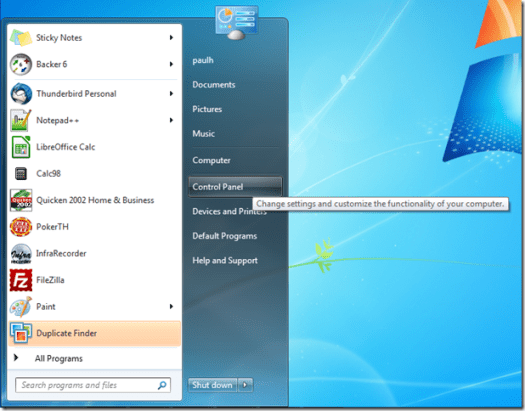
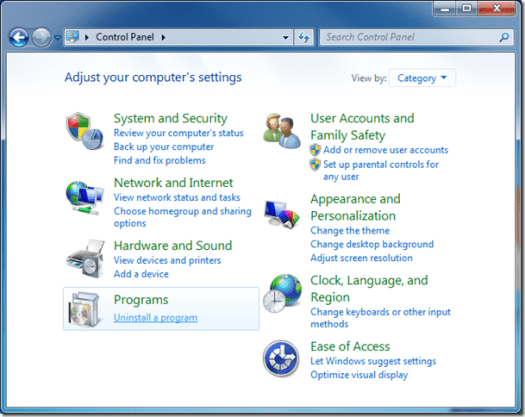
This morning I decided to investigate more and discovered these two somewhat related problems in the LibreOffice bug list (weird, the bug list server went down as I was testing the links). It turns out there is a bug in the LibreOffice Explorer shell extensions DLL, some users recommended using the command line tool to un-register the DLL but, one user said he solved his problem by re-installing LibreOffice and disabling the shell extensions option. This made me think that the easiest way would be to use the change feature of the Windows Installer. I tried it out and it worked perfectly fixing the problem. Here are step by step screen shots of this easy way to fix this problem.

ScreenShot01ScreenShot02ScreenShot03ScreenShot04ScreenShot05ScreenShot06ScreenShot07ScreenShot08ScreenShot09ScreenShot10

The rest of the steps should be obvious.

Old Quicken Registration Annoyance

When you install an old version of Quicken on a new PC, Quicken wants to register itself and make online services available. It can’t actually complete the registration so it gives up and asks for permission to retry every time you open Quicken.

To disable this you need to execute a hidden command, hold down Ctrl+Shift while selecting the One Step Update menu item. Quicken responds with a dialog that says “You will no longer be prompted for registration.”. The One Step Update menu item is located in the Finance menu for Quicken 2001-2002 and in the Online menu for Quicken 2003-2005.

I found this information here.

We had a Leap Second

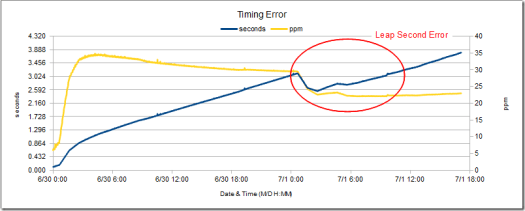
Thanks to the Bad Astronomer I heard about the scheduled leap second yesterday before it happened. For most people on the planet this event should have been completely unnoticed. I however have been running timekeeping accuracy tests for a new product so it would affect the test results. Since I ‘m using a standard NTP time sync, not actually directly syncing with an atomic clock, I wasn’t sure what the error would be like. In fact just looking at the basic statistics from the logged data I couldn’t see the error. So I graphed the errors and the leap second effect became clearly visible.

leap_second_error

It looks like the NTP servers involved (there are multiple servers) changed the abrupt midnight UTC leap second adjustment into a gradual adjustment starting around midnight local time (EDT). Also note that leap second error fell within the already recorded error bounds which is why the basic statistics for the data didn’t show the leap seconds contribution. This reinforces my mantra when it comes to data analysis, simple graphing reveals far more about oddities of a data set than any numerical statistical analysis. Check out NIST/SEMATECH e-Handbook of Statistical Methods for many more examples of how graphs reveal more about data than numerical statistics.

Outlook to Thunderbird Migration

I’ve been trying to break the strangle hold of Outlook PST files for years without much success. The problem has always come down to having thousands of archived messages dating back to 1997 in two large PST file archives (personal & work). I could have manually exported the emails into separate text files but that is a huge task and I’d be left with archives that aren’t easy to search. What I wanted was a way to extract all the emails into an open format that retained the folder structure and would be easily importable to a different email client. After much research and study I decided that the best format to use would be mbox primarily because it stores the mail as plain text. Although it comes in a few different varieties used by specific clients they are all well documented and conversion between the versions is not difficult.

Trying to read PST files is very difficult because Microsoft does not publish information on the format. Originally they did this with all the file formats used in their Office products but, do to consumer pressure and people cracking their formats, they eventually gave up and opened up many of them. The solution for PSTs is to use the open source libpst library on a *nix compatible OS. I installed libpst on my Ubuntu PC, copied the PST files to a subdirectory of my home directory and created separate lower subdirectories to receive the mbox files/directory structures. Now all I had to do was open a terminal, session change to the directory with the PST files and issue the following command once for each PST file (readpst -u -o output-directory pstfilename). The output from the readpst program made me a bit concerned that some items had not been extracted, here’s an excerpt of the output:

“Misc” – 2916 items done, 1 items skipped.
“Vendors” – 354 items done, 7 items skipped.
“Product Development” – 254 items done, 1 items skipped.

To see why some items were skipped I opened the PST file in Outlook and was pleasantly surprised to find that the item counts in Outlook matched the items done counts exactly. Thinking about this I came to the conclusion that the skipped items were simply blank or corrupted areas within the PST database that were left after deleting emails and compacting the PST. With everything extracted from the PSTs the next step was to choose a new mail client and import the old data.

I’ve been using Firefox and it’s predecessors for a decade so it was no surprise that my favorite of the clients I tried was Thunderbird. One of the most important features is one I use extensively with Firefox, multiple profiles. Here are some links to information about profiles, Profiles How to Thunderbird, Using Multiple Profiles How to Thunderbird, Run multiple copies of Thunderbird at the same time, Starting your Mozilla application with a specified profile. In Outlook I’ve always had to use one PST file and set of defaults for my work and personal email. I was able to have separate archive PSTs but I never found a usable way to have separate PST inbox and other folders to keep my personal and work email isolated. Another situation that is somewhat unique is that I work form home three days a week, so I need to have my work as well as my personal email available on my main workstation. This has led to occasionally getting work and personal emails filed in the wrong folders, which flows through to the archives, and occasionally using the wrong account for sending an email. Having separate profiles for my work and personal email eliminates the possibility of getting the emails or origination address wrong. I ended up using four profiles, work, work archives, personal and personal archives, I like to keep the archives separate from my current mail to not bog down the client when searching since it isn’t very often I need to find emails from last century. I figured I’d need to use the export/import functions for moving old emails to the archive but I tried and sure enough if I have both profiles open I can simply drag and drop old email to the archive profile. Note, even though as of this writing drag & drop works well, I do not believe this is a supported feature of Thunderbird so it could be removed in future versions and you canÂ’t expect support.

With my new client chosen and the data extracted from the PSTs I was ready to import everything. While Thunderbird has very good import capabilities I found two extensions that gave me more powerful import capabilities, the ImportExportTools Add-on (ImportExportTools Homepage) and the MoreFunctionsForAddressBook Add-on (Allows import of multi-card vcd files). After importing my contacts I realized what a mess those had become over the years (these were not import errors, the data within Outlook was this way). The main problems were garbage characters in unused fields, addresses and phone numbers in the wrong place (work vs. home), inconsistent address, display name and phone formats. To rapidly fix these errors I exported the address books to csv files, imported them into LibreOffice Calc, made the corrections and then re-imported into Thunderbird. One detail to pay attention to if you do this, make sure you set the zip code fields to text when importing into Calc to avoid losing leading zeros.

A feature of Outlook that is not the default for Thunderbird is to have a single inbox for multiple email accounts. Thunderbird is like Outlook Express/Windows Mail and shows separate inboxes for each account. However there is a Global Inbox feature in Thunderbird that gives you the unified inbox like Outlook. The next feature from Outlook that is not in a default Thunderbird installation is the ability to use different automatic signatures for a single email account. This is a feature I use almost every work day to give me three different sig lines depending on the recipient. A formal one for customers/vendors I don’t know personally, a less formal sig for the customers/vendors I do know personally and the third is for co-workers (simply Paul). Of course as I would expect there’s an extension that gives this exact capability, the Signature Switch Add-on (home page). The next issue I needed to figure out was how to change the SMTP server depending on which office I’m sending mail from. While it’s possible to do this manually once again I found an extension that handles this task completely automatically, the SMTP Control Add-on (SMTP Control Overview). With everything running smoothly I started playing with more feature and hit a problem with the junk mail filter system, a little searching found the solution in a forum thread, Junk mail selections won’t stay checked (scroll down to the January 22nd, 2012, 2:39 am post from ss2115).

The last Outlook feature that I needed was to have an integrated calendar, for that the Lightning Add-on works great. I was able to import the extracted PST calendars easily but as I was scrolling through the future events I noticed that the time for recurring events was off by one hour after the DST/EST change date. Once again the answer was just a Google search away from a forum thread, Thunderbird calendar plugin and daylight savings. Looking at the imported calendar items, at first I couldn’t see any time zone setting for events, then I found that the Options menu in the Event editing window has that field off by default. Sure enough with the time zone field turned on I saw that my imported events where UTC, I changed them to EST and the problem was solved. The final issue I worked on was how to keep separate calendars for work and personal items but still be able to see both in each profile to avoid scheduling conflicts. For my work calendar I exported the calendar as an ICS file in the work profile directory and deleted the calendar from Lightning. Then I opened the ICS file in both my work and personal profiles (do not import the ICS, use the “file > open > calendar file” command), it works very well, both profiles can view edit and add events, see Exporting and sharing a calendar for more info. With my personal calendar I chose to import those events into a Yahoo calendar and then add the cloud based calendar to both profiles, this also works great see Thunderbird and Yahoo How To for more details.

It’s been a week since I completed the transition to Thunderbird and I’m very pleased with the results. I have all the capabilities of Outlook that I need while adding excellent separation of work and personal items and open data formats to make sure I can use the data easily in the future. On top of this I can install Thunderbird on any PC I need to use and on a portable Flash drive without having to think about if I have enough licenses to stay legal.

A Case Study in How Not to Communicate with Readers of a Blog

A post on the Document Foundation Blog last week confused all the readers, including myself, and the author has only compounded the confusion. So, I thought I’d use it as a case study to point out what I feel are best practices for blog writers.

Here’s the post:

There is currently a discussion going on about removing our Facebook group in favor of a regular page. If you want to join the discussion, we look forward to your comments!

The initial responses where all basically variations of, a regular web page is better than requiring Facebook enrollment. While the link at the end of the two sentence post pointed to Facebook, it didn’t occur to anyone commenting that the author had a very different idea of what a “regular page” is.

After seven comments the author added this comment:

Before we get into endless threads about who likes Facebook and who doesn’t:

So, the question to discuss here is not whether to post at Facebook at all, but rather whether to have two pages there or only one.

As soon as I saw this I realized that the author was either unclear in his initial writing or attributes a very different meaning to the phrase “regular page”. The final sentence of the comment makes it very clear that in his initial post he meant, removing our Facebook group in favor of a Facebook page. Most bloggers would have modified the original post so that it aligns with the author’s comment but this didn’t happen, the post was left as is with its original confusing language intact.

I replied to his comment with this:

Oh sorry, I misunderstood your blog post.

IMHO, if you are asking solely about having one or two Facebook pages then it’s best to not even mention it on the blog, keep it on Facebook only. Then I and other non-Facebook users won’t see it and respond.

The next day my reply was replied to by another person:

He meant not two pages _there_ (on Facebook), rather one there _and_ one outside of Facebook.

This reply clearly demonstrated the problem with not modifying a post that is clearly confusing all the readers. This commenter had a third variation in interpretation of what this post and later author comment were trying to say.

After seeing this further confusion, my hope was that he would do one of the things that other bloggers do when a misunderstanding happens. The first and IME most common way to rectify the situation is to acknowledge the problem in a comment and also edit the original post to clarify or correct the information. An example of this technique is this post on the Bad Astronomy blog. Another viable option is to skip the comment and instead only edit the post to clarify the information. For this specific Document Foundation post a third viable option is to simply delete the post altogether since it only applies to Facebook users not general blog readers. Generally it’s not a good idea to delete posts as it can lead to odd conspiracy rants about disappearing information, but in this particular situation I think that risk is minimal.

Over the following days more comments piled up showing that the confusion was in no way reduced. On the sixth day a comment was left stating the commenter would just use Microsoft Office since the only place to discuss LibreOffice is Facebook. This was yet another way of misunderstanding the authors intent and definitely over the top but that is to be expected on blogs.

When I saw that comment I thought that maybe this further showing of the confusion would prompt the author to fix the situation but sadly I was wrong. Rather than own up to the problem the author posted the following comment.

Did anyone actually read my posting? ;-)
As said, it is good to “pick up people” where they are. To spread the message about LibreOffice and free software, we also use Facebook, because it helps to reach an audience we would not reach otherwise.
However, the only official communication and discussion channel was and is our mailing lists, so don’t worry.
Comments like “I do not use Facebook” do not help this discussion at all.

Ugh, that is perhaps the absolute worst possible way to handle a situation of misunderstanding with your readers. If every single comment on your blog shows that your readers are not understanding what you’re writing don’t accuse them of poor reading comprehension (even with a winking emoticon). The author should face the fact that they have not been clear in communicating with their readers and take steps to clarify the post.

To wrap up, here’s my recommendations for avoiding the problems that occurred.

  1. Don’t post items to your blog when you don’t want comments from all of your blog readers. In this case it was a topic only meant for Facebook users so it should only be posted to Facebook. An exception to this would be when you are trying to encourage your readers to sign up for another platform. In that case go ahead and post but make it crystal clear that you are recruiting for the other platform.
  2. When 100% of your readers are not interpreting your words as you intended, assume you are not clear in what you wrote. Then take the time to figure out why there is confusion and attempt to clarify your wording by editing your post (and optionally add a comment acknowledging the confusion and apologize for creating it). Even when only a minority of your readers are misunderstanding, you should re-think what you wrote and if possible rephrase it to minimize misunderstandings.
  3. Be humble, don’t accuse your readers of poor reading comprehension. As an author it is your responsibility to write in a way that conveys your intent clearly to your readers. While there is no way for me to know for certain, I suspect some of the Document Foundation blog readers will be turned off by the way this played out and will stop reading that authors posts or the entire blog.

There is an exception I’ll make to these recommendations. If it is a personal blog and you don’t care about readership then do whatever you find fun. In fact specifically trying to be unclear and creating confusion is considered a fun pastime for some people (trolling). I don’t enjoy it but with personal blogs the primary goal should be for the author to have fun so if it’s your cup of tea go for it. But when you are blogging for an organization you should always try to be as clear as possible and make it easy for the blog readers to get your point.

A final word, being only an amateur writer I may not have clearly expressed my thoughts in this post (or any post I ever make). Also my blog is set to close comments one month after the last comment is received, if you come here later simply email me and I’ll reset the system so that you can add a comment.
RSS Feeds for Static Web Pages

An old post from 2010 outlined a method that I used successfully to create update feeds for some of my static websites. It’s been a long time since I needed to add an entry to the feeds and when I went to do it yesterday I discovered it doesn’t work any more. This is because Google changed Reader removing the Note in Reader function that the old method relied upon.

After searching around the net I came to the conclusion that I’d have to just manually create the XML files for the RSS feeds. I spent some time getting it to work but the biggest hurdle is re-working the HTML snippets for the feed. You have to change all the XML reserved characters to escaped versions, which I got wrong many times.

It became very apparent that hand editing the XML was not going to be a viable way to create the feed because of the amount of time it would take to get each update correct. So I searched more and found a solution that I wish IÂ’d found before I started in 2010.

The truly simple and painless way to create RSS feeds for static web sites is an application from Dan Bricklin. He released the program nearly a decade ago but for some reason almost no one mentions it in response to questions about this topic. The program, ListGarden is released under the GPL and available as a generic Perl application, a Windows binary and a Mac OS-X Perl application.

The documentation is excellent making it very easy to get up and running. Once the XML is created and placed on the web site, simply point FeedBurner to the XML and you’re done. Well there’s actually a bit more required for best effect but there are a ton of resources on the net that cover the topic including the FeedBurner Help pages.

I do have one tip for using ListGarden, if you use the Reorder function make sure to modify the PubDates so that the list remains in chronological order. I didn’t do this and it made FeedBurner act very strange.

In case you’re interested, the best page I found for manually creating the XML file is: How to Create an RSS Feed With Notepad, a Web Server, and a Beer ~ Stephen’s Web.

An Insanely Intrusive EULA

UPDATE Feb. 29, 2012 – A new version of MPLAB X has been released and they removed the auditing clause completely. That makes this old post no longer applicable.

Thank You Microchip

On the Microchip forum somebody read the license agreement for their new free IDE, “MPLAB X” and found this in section 1c.

Microchip’s authorized representatives will have the right to reasonably inspect, announced or unannounced and in its sole and absolute discretion, Licensee’s premises and to audit Licensee’s records and inventory of Licensee’s use of the Software, whether located on Licensee’s premises or elsewhere, at any time, in order to ensure Licensee’s adherence to the terms of this Agreement.

What! They demand the right to enter a companies or persons premises unannounced because someone clicked yes on a EULA! It turns out this is not all that new for Microchip, a post from June 2009 says that this is also in the dsPIC dev kit EULA.

This could be a huge problem for my work, I can’t imagine the company lawyers are going to allow me to use MPLAB X with this onerous of a EULA. Thankfully all current Microchip based projects are using MPLAB 8 and their Hi-Tech C Pro compiler which do not have this condition on usage. The problem will be in five or more years when MPLAB 8 is gone and we still need to support our products (our average life cycle is 20 years). I’ll just have to remember to keep a copy of MPLAB 8 around so that I can still use their debuggers and programmers when needed in the future.

I hope they change their tune and remove this onerous clause. If they do not change this I will be forced to no longer consider Microchip processors for new projects :-(.

Thanks to Alan on the PIClist for pointing this out.