Keeping an application out of the recent programs list

I’ve grown to like the recent programs list in XP but, I use WIZMO by Steve Gibson often to close drives and eject removable media and I don’t want it showing up in the list. Also, I have desktop or quick launch shortcuts for many programs that I use frequently so, I don’t want them in the list either.

Right clicking on an item in the recent programs list lets you pin it to the menu so that it is always up top but there is no option to exclude it from the list. Searching around I found the solution in a Microsoft Knowledge Base Article , a simple registry edit will prevent a program from appearing in the recent programs list. Here’s the instructional text from the article:

WARNING: If you use Registry Editor incorrectly, you may cause serious problems that may require you to reinstall your operating system. Microsoft cannot guarantee that you can solve problems that result from using Registry Editor incorrectly. Use Registry Editor at your own risk.

1. Start Registry Editor (Regedit.exe).
2. Add an empty string value named NoStartPage to the following registry key, where Program name.exe is the name of the executable file that is used to start the program:
HKEY_CLASSES_ROOTApplicationsProgram name.exe
3. Quit Registry Editor, and then restart the computer

In searching for the recent programs exclusion solution, I stumbled onto information that I have never found at any of Microsoft’s sites. This tip solves a somewhat annoying situation that I hadn’t tried fixing yet, programs never appearing in the list of the open with dialog.

Tip: Show Programs in the Open With Selection Box
This setting allows you to decide which programs are listed in “Open With” dialog box which is shown when an unknown file type is opened. Go to Start/Run/Regedit and navigate to this key: [HKEY_CLASSES_ROOTApplications]
To stop a specific application appearing in the “Open With” list select the associated sub-key and create a new empty string value called “NoOpenWith”. To allow an application to be shown in the list delete the “NoOpenWith” value. Restart Windows for the change to take effect.

In that list of tips I also spotted a command line utility built into XP that I hadn’t looked at before. The description on that tips page isn’t clear to me so I’ll write my own description here. The program is named “ASSOC”, as with all good command line programs for Windows, if you enter ASSOC /? at a command prompt you get the usage instructions, which say:

Displays or modifies file extension associations

ASSOC [.ext[=[fileType]]]

.ext Specifies the file extension to associate the file type with
fileType Specifies the file type to associate with the file extension

Type ASSOC without parameters to display the current file associations. If ASSOC is invoked with just a file extension, it displays the current file association for that file extension. Specify nothing for the file type and the command will delete the association for the file extension.

This is handy for getting a list of all currently assigned file associations, simply enter:

ASSOC >C:Assoc.txt

at a command prompt or,

CMD /C ASSOC >C:Assoc.txt

in the “Start-Run…” dialog and you’ll get a text file list to review.
Boston freaks out again

An MIT student wearing her electronic art hoody is arrested by the foolish authorities who don’t seem to know what a bomb looks like. After the Mooninite fiasco you’d think they would get a clue. I guess we’re all just going to have to try to think like idiots so that our pretty flashing art projects don’t get us hauled in by the brain dead authorities in Massachusetts. With this low of an intelligence level I have zero confidence that these bozo’s will be able to prevent an actual bomb plot if it happens in Boston.

For a good pictures and more details read the articles here and here.

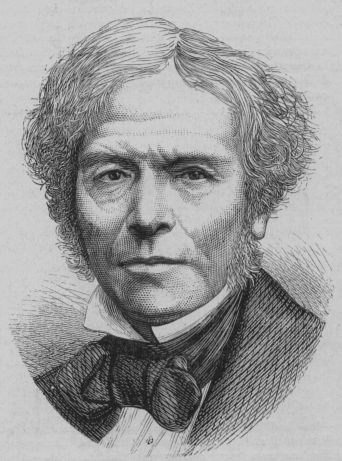
Happy Birthday Michael Faraday

michael-faraday

On this day, September 22, 1791 in South London, England, Michael Faraday was born. Faraday’s work in chemistry, electricity, and magnetism were instrumental in advancing science in the 19th century. Sadly, because of the prejudice of the society of the time, Faraday was not considered a gentleman and did not receive as much honor and respect in his early years as he deserved. In the 20th century we have made up for this a bit by awarding him an honor only a very few receive, the SI unit of capacitance is named the farad to honor his work.

There is a lot of good information about him on the web so rather than repeat it here I’ll send you to the references cited below and end this post with one of my favorite Faraday quotes. In his laboratory notebook dated March 19, 1849 at the end of many paragraphs of deep thoughts he writes:

ALL THIS IS A DREAM. Still examine it by a few experiments. Nothing is too wonderful to be true, if it be consistent with the laws of nature; and in such things as these, experiment is the best test of such consistency. (from “The Life and Letters of Faraday” By Bence Jones Vol. II page 253)

Faraday’s rock solid belief that only through meticulous repeatable experiments could the truth of nature be divined is as essential in the 21st century as it was in the 19th. So, lets all celebrate the life of this self educated, lower class, son of a blacksmith who laid the foundations for much of our present technological society.

Wikipedia Biography

Books
Biography
The Life and Letters of Faraday By Bence Jones Vol. I
The Life and Letters of Faraday By Bence Jones Vol. II

Written by Michael Faraday:
from Project Gutenberg
Experimental Researches in Electricity, Volume 1
The Chemical History of a Candle by Michael Faraday

Google Book Search 12 volumes

The War Starts Sunday

No we aren’t invading Iran this weekend, Ken Burns latest documentary “The War” starts this Sunday evening on PBS. Here’s a brief description from the web site:

THE WAR, a seven-part series directed and produced by Ken Burns and Lynn Novick, tells the story of the Second World War through the personal accounts of a handful of men and women from four quintessentially American towns. The series explores the most intimate human dimensions of the greatest cataclysm in history. a worldwide catastrophe that touched the lives of every family on every street in every town in America, and demonstrates that in extraordinary times, there are no ordinary lives.

Ken Burns has been my favorite documentary filmmaker, ever since Brooklyn Bridge debuted in 1982. If you haven’t seen that Academy Award nominated film you can see it on PBS 10/21. I’ve watched and enjoyed all his work so, I’m really looking forward to seeing his take on WWII.

WordPress Plugins

Now that I’ve upgraded WordPress, I added a number of plugins. Many of these I heard about from a post at Greg Laden’s fine blog, Evolution – not just a theory anymore .

Plugin Description
Blog Copyright Display dated copyright mark. Post/Page (post date or custom field) and archive aware. By Kaf Oseo.
Chunk Urls for WordPress This plugin shorten urls in comments so that they won’t break your site. By whoo.
deUncategorize Deselects the default category (commonly Uncategorized) upon selecting a different category on new posts (makes use of JavaScript). By Daniel M. Gattermann.
Get Recent Comments Display the most recent comments or trackbacks with your own formatting in the sidebar. By Krischan Jodies.
Lucia’sLinkLove Where a commenter has commented at least some number of times links are made dofollow. By Lucia Liljegren.
Rodney’s Search Widget Adds a Sidebar Widget that properly implements a search form for you sidebar. By Rodney Shupe.
Search Meter Keeps track of what your visitors are searching for. By Bennett McElwee.
Subscribe To Comments Allows readers to receive notifications of new comments that are posted to an entry. Based on version 1 from Scriptygoddess By Mark Jaquith.
WordPress.com Stats Tracks views, post/page views, referrers, and clicks. Requires a WordPress.com API key. By Andy Skelton.
WordPress Database Backup On-demand backup of your WordPress database. By Austin Matzko.

Andrew Keen on the News Hour

Tonight’s News Hour on PBS had an interview with Andrew Keen, author of “The Cult of the Amateur: How Today’s Internet Is Killing Our Culture”. He comes across as someone I would never want to talk to or read anything he’s written. Basically he looks and sounds like a grumpy old man screaming “Hey you kids, get off of my lawn”.

More info on Keen and his book:
Keen’s “The Cult of the Amateur”: BRILLIANT! (Lessig Blog)
EdCone.com: Not so keen
commonground : Blogs Suck, Who Cares?
EvolutionBlog : The Importance of Bloggers

FileZilla 3.0.0

There’s a new version of my favorite FTP client out, FileZilla v3.0.0, give it a try. Note for those upgrading, to get your settings into the new version simply choose “Edit – Import…” and point to your old FileZilla.xml configuration file.

Hacked university sites

Lately I’ve been getting quite a few blog spam comments that try to insert links to hacked university web sites. One of the hacked systems was even loading and displaying porn photos on their forum software, ouch. All the systems seem to have suffered from SQL injection vulnerabilities in forum and calendar software.

I’m now trying to pay attention to where the spam links are pointing when I review the spam bucket. When I see a .edu domain I make the effort to e-mail the university web master to let them know they have been hacked. So far the sites I’ve reported have all been repaired and I’ve gotten a couple of thank you replies in return.

I’d like to suggest that all the blog owners out there try to keep an eye out for hacked .edu domains showing up in their spam bucket. Then let the university know so that they can get it fixed before they get into trouble.